When a checkout lane drops offline, every minute of downtime costs real revenue, so the networking gear behind your point-of-sale systems matters more than most office equipment. For most small businesses, the TP-Link TL-SG108E Easy Smart Switch is the best overall pick because its QoS and VLAN support let you prioritize payment traffic without paying for full managed-switch complexity. If you need to power IP cameras or Wi-Fi access points alongside your terminals, the TP-Link TL-SG1008MP PoE+ switch bundles that into one box, while the Domotz Box C-1 adds network monitoring so you know about a failing device before the registers do. The main tradeoff in this category is simplicity versus control: unmanaged plugs-and-play switches never misconfigure anything, but smart managed models give you the traffic shaping and diagnostics that keep payment traffic moving during congestion. Read on for the full breakdown of all ten options and which one fits your setup.

Get smart everyday buys delivered free with Prime
- Fast, free delivery on millions of items
- Prime Video, Amazon Music and more included
- Member-only deals all year
Key Takeaways
- Smart managed switches (the TL-SG108E and GS308E) took the top spots because QoS prioritization of payment traffic is the single most effective uptime feature at this price level.
- PoE+ support on the TL-SG1008MP eliminated separate power supplies for cameras and access points, cutting the number of failure points around a checkout area.
- Unmanaged switches like the NETGEAR GS316v3 and TP-Link TL-SG1024S are the right choice only when checkout lanes sit on a dedicated, low-traffic network — they cannot isolate or prioritize POS traffic.
- The Domotz Box C-1 was the only product in the lineup that addresses detection rather than prevention, which matters because most checkout outages come from devices failing silently, not raw bandwidth shortages.
- The TP-Link ER605 VPN router earned a spot because checkout uptime often depends on the WAN side — redundant WAN support handles ISP outages that no switch can fix.
| Domotz Box C-1 Network Monitoring Hardware |  | Best for Proactive Uptime Monitoring | Processor: Allwinner H618 | RAM: 1GB LPDDR4 | Network Port: Gigabit Ethernet | VIEW ON AMAZON | See Our Full Breakdown |
| NETGEAR 16-Port Gigabit Ethernet Unmanaged Network Switch (GS316v3) |  | Best Expansion Pick for Growing Checkout Banks | Ports: 16 x 1Gbps Ethernet | Port Speed: Auto-negotiating | Cable Compatibility: Cat5e / Cat6 | VIEW ON AMAZON | See Our Full Breakdown |
| TP-Link TL-SG108E 8-Port Gigabit Easy Smart Managed Switch |  | Best Value for Traffic Prioritization | Ports: 8 x Gigabit RJ45 | Switch Type: Easy Smart managed (Layer 2 lite) | VLANs: Up to 32 simultaneous (of 4K IDs) | VIEW ON AMAZON | See Our Full Breakdown |
| TP-Link TL-SG1008MP 8-Port Gigabit PoE+ Switch |  | Best for Powering Register Peripherals | Ports: 8 x Gigabit RJ45, all PoE+ | PoE Standard: 802.3at/af | Max Power Per Port: 30W | VIEW ON AMAZON | See Our Full Breakdown |
| NETGEAR GS308E 8-Port Gigabit Easy Smart Managed Network Switch |  | Best Managed Pick for Segmented Checkout LANs | Ports: 8 x Gigabit RJ45 | Switch Type: Easy Smart managed | Management: Web GUI (Windows, Mac, Linux) | VIEW ON AMAZON | See Our Full Breakdown |
| Linksys LGS105 5-Port Business Desktop Gigabit Ethernet Unmanaged Switch | 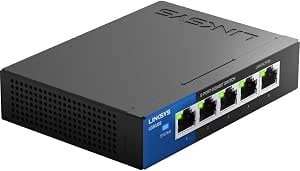 | Best for a Single Checkout Lane | Ports: 5 x Gigabit Ethernet (auto-sensing) | Max Speed: 1,000 Mbps | Type: Unmanaged switch | VIEW ON AMAZON | See Our Full Breakdown |
| UGREEN 24 Port Gigabit Switch, Rackmount 4 Mode Plug & Play Ethernet Switch |  | Best Premium 24-Port Pick | Ports: 24 x 10/100/1000Mbps auto-negotiation | Type: Plug & play with 4 selectable modes | Modes: Standard, VLAN isolation, link aggregation (2Gbps), flow control | VIEW ON AMAZON | See Our Full Breakdown |
| TP-Link ER605 Wired Gigabit VPN Router |  | Best for Internet Failover | Ports: 1 Gigabit WAN + 2 Gigabit WAN/LAN + 2 Gigabit LAN | USB WAN: 4G/3G modem backup supported | WAN Support: Up to 3 WAN ports with load balancing | VIEW ON AMAZON | See Our Full Breakdown |
| NETGEAR 5-Port Gigabit Ethernet Unmanaged Network Switch (GS105NA) |  | Best Value Workhorse | Ports: 5 x 10/100/1000 Mbps auto-negotiating | Type: Unmanaged switch | QoS: DSCP-based traffic prioritization | VIEW ON AMAZON | See Our Full Breakdown |
| TP-Link TL-SG1024S 24 Port Gigabit Ethernet Switch |  | Best Value Rack Switch | Ports: 24 x 10/100/1000Mbps RJ45, auto negotiation / auto MDI/MDIX | Type: Unmanaged switch | Flow Control: IEEE 802.3x | VIEW ON AMAZON | See Our Full Breakdown |
| office networking gear for checkout uptime | Ports | Mounting |
|---|---|---|
| Domotz Box C-1 Network Monitor | — | Rack-mountable or standalone |
| NETGEAR 16-Port Gigabit Ethern | 16 x 1Gbps Ethernet | Desktop or wall-mount |
| TP-Link TL-SG108E 8-Port Gigab | 8 x Gigabit RJ45 | — |
| TP-Link TL-SG1008MP 8-Port Gig | 8 x Gigabit RJ45, all PoE+ | — |
| NETGEAR GS308E 8-Port Gigabit | 8 x Gigabit RJ45 | — |
| Linksys LGS105 5-Port Business | 5 x Gigabit Ethernet (auto-sensing) | — |
| UGREEN 24 Port Gigabit Switch | 24 x 10/100/1000Mbps auto-negotiation | 19-inch rack, wall, or desktop |
| TP-Link ER605 Wired Gigabit VP | 1 Gigabit WAN + 2 Gigabit WAN/LAN + 2 Gigabit LAN | — |
| NETGEAR 5-Port Gigabit Etherne | 5 x 10/100/1000 Mbps auto-negotiating | Desktop or wall mount |
| TP-Link TL-SG1024S 24 Port Gig | 24 x 10/100/1000Mbps RJ45, auto negotiation / auto MDI/MDIX | Desktop or 19-inch rackmount |
More Details on Our Top Picks
Domotz Box C-1 Network Monitoring Hardware
Every other product in this roundup keeps your checkout network running — the Domotz Box C-1 tells you the moment it isn’t. This appliance deploys in about 15 minutes, down from 40-plus with earlier models, and its upgraded Allwinner H618 processor with 1GB of RAM handles gigabit speed tests and SNMP v3 encrypted monitoring without breaking a sweat. That speed-test capability matters for checkout lanes: if card readers are timing out, you want to know whether the WAN link or the LAN switch is the culprit. Compared with the TP-Link TL-SG108E, which can mirror ports but only shows you raw traffic, the C-1 delivers alerts, dashboards, and automated diagnostics. The tradeoff is real, though: the hardware is useless without a Domotz software subscription, adding a recurring cost, and it monitors rather than fixes — you still need the switches and routers it watches over.
Pros:- Provisions in about 15 minutes, a fraction of the setup time of previous-generation appliances
- Gigabit speed tests and SNMP v3 encryption isolate whether WAN or LAN is slowing card transactions
- Domotz maintains the OS and pushes security updates, reducing liability for managed service providers
- Plug-and-play multi-VLAN configuration works without deep networking expertise
Cons:- Hardware is inert without a separately sold Domotz software subscription
- Monitoring only — it cannot switch, route, or power devices, so it supplements rather than replaces other gear
- Separate AV or camera VLANs require additional hardware
Best for: MSPs and multi-site retailers who need to catch network failures at checkout lanes before customers notice
Not ideal for: Single-office setups on a tight budget — the mandatory ongoing subscription plus monitoring-only role makes it overkill when a managed switch like the GS308E covers the basics
- Processor:Allwinner H618
- RAM:1GB LPDDR4
- Network Port:Gigabit Ethernet
- Power Port:USB-C
- Deployment Time:Approx. 15 minutes
- Security:SNMP v3 encryption
- Subscription Required:Yes (Domotz software, sold separately)
- Mounting:Rack-mountable or standalone
Our verdict“Buy this if you manage checkout networks across multiple sites and need early warnings, not just connectivity.”
NETGEAR 16-Port Gigabit Ethernet Unmanaged Network Switch (GS316v3)
When your checkout counter grows from four lanes to ten, the NETGEAR GS316v3 is the straightforward answer: 16 auto-negotiating gigabit ports with genuinely zero configuration. Where the 8-port TL-SG108E asks you to log into a web interface for VLANs and QoS you may never touch, this switch just forwards packets the moment you plug in Cat5e or Cat6 cabling. The fanless metal chassis sits silently beside a register or wall-mounts behind a counter, and IEEE 802.3az energy-efficient Ethernet trims power draw on idle ports — a small but real saving when the switch runs 24/7. The honest tradeoff is the absence of any management: no port mirroring, no loop detection, no VLANs. If a cable loop takes down your card traffic, an Easy Smart model like the GS308E would flag it while the GS316v3 stays mute. It is also US/Canada-only, so international deployments need a different SKU.
Pros:- 16 gigabit ports provide generous headroom for registers, card readers, and receipt printers
- True plug-and-play with no software or setup steps
- Fanless silent operation suits customer-facing counter areas
- Energy-efficient Ethernet reduces ongoing power costs
Cons:- Completely unmanaged — no diagnostics, VLANs, or loop protection when something goes wrong
- Sold for US and Canada use only, limiting international rollouts
Best for: Store owners expanding a checkout bank who need lots of gigabit ports with literally nothing to configure
Not ideal for: Anyone wanting traffic segmentation or diagnostics — the unmanaged design means no VLANs, no QoS, and no visibility when transactions stall
- Ports:16 x 1Gbps Ethernet
- Port Speed:Auto-negotiating
- Cable Compatibility:Cat5e / Cat6
- Switch Type:Unmanaged plug-and-play
- Cooling:Fanless silent design
- Power Efficiency:IEEE 802.3az Energy Efficient Ethernet
- Mounting:Desktop or wall-mount
- Regional Compatibility:US & Canada only
Our verdict“The right pick when port count and simplicity matter more than manageability — skip it if you need visibility into traffic.”
TP-Link TL-SG108E 8-Port Gigabit Easy Smart Managed Switch
The TL-SG108E earns its spot by adding just enough intelligence to matter for checkout uptime without the cost or complexity of a fully managed switch. Its QoS features (port-based, 802.1p, and DSCP) let you prioritize payment terminals over background traffic, so a big file sync elsewhere in the office won’t make card readers lag. It also supports up to 32 simultaneous VLANs, port mirroring, loop prevention, and cable diagnostics — tools the unmanaged TL-SG1008MP simply doesn’t offer, and ones that help you locate a flaky cable run before it takes down a register. Compared with the NETGEAR GS308E, the TP-Link matches nearly every feature while adding link aggregation, which is handy if you trunk two cables back to a core switch for redundancy. The web-based management is functional but dated, and configuration lives in the switch rather than a cloud dashboard, so remote management means walking to the device or setting up a VPN first.
Pros:- QoS keeps latency-sensitive payment traffic smooth even during network congestion
- VLAN support (port, tag, and MTU based) isolates checkout traffic from guest or office networks
- Cable diagnostics and loop prevention locate faults before they cause downtime
- Link aggregation adds an uplink redundancy option rarely found at this tier
Cons:- Local web-based management only — no remote cloud configuration
- Interface is utilitarian and can confuse first-time admins
- Fanless design caps it at a 40°C ambient temperature rating
Best for: Small offices that want to prioritize payment traffic and segment VLANs on a tight budget
Not ideal for: Multi-site managers wanting remote cloud management — configuration is local-only, unlike the Domotz Box C-1’s subscription dashboard
- Ports:8 x Gigabit RJ45
- Switch Type:Easy Smart managed (Layer 2 lite)
- VLANs:Up to 32 simultaneous (of 4K IDs)
- QoS:Port-based / 802.1p / DSCP
- Management:Web interface or free desktop software
- Layer 2 Features:IGMP snooping, port mirroring, loop prevention, LAG
- Chassis:Metal with shielded ports
- Warranty:3 years
Our verdict“The smartest spend in this lineup for buyers who need traffic control at the checkout counter, not just ports.”
TP-Link TL-SG1008MP 8-Port Gigabit PoE+ Switch
Checkout uptime isn’t only about data — it’s about power, and the TL-SG1008MP delivers both over a single cable. All eight ports carry PoE+ (802.3at/af) at up to 30W each, with a 126W total budget that comfortably runs IP cameras watching the tills, wireless access points for handheld scanners, and VoIP phones at the customer service desk. Compared with the unmanaged NETGEAR GS316v3, you give up half the ports but gain the ability to place powered devices anywhere a cable reaches — no outlets required. The overload protection with port prioritization is the standout safety feature: if total draw spikes, low-priority ports drop before your checkout-critical devices do. The tradeoffs mirror its simplicity. There are no VLANs, no QoS, no management at all, and the 126W budget can’t feed all eight ports at full 30W simultaneously, so plan your power math before plugging in eight cameras.
Pros:- All 8 ports deliver PoE+ up to 30W, eliminating separate power supplies at the counter
- 126W total budget handles a realistic mix of cameras, APs, and phones
- Overload protection with port prioritization protects critical devices first
- Sturdy metal case works desktop or rackmounted
Cons:- Unmanaged — no VLANs, QoS, or any configuration options
- Total PoE budget falls short of powering all 8 ports at maximum load at once
Best for: Retailers running PoE cameras, access points, and phones around the checkout area who want one box to power and connect them
Not ideal for: Buyers needing traffic segmentation or QoS — the fully unmanaged design offers none, making the TL-SG108E the better choice for prioritized payment traffic
- Ports:8 x Gigabit RJ45, all PoE+
- PoE Standard:802.3at/af
- Max Power Per Port:30W
- Total PoE Budget:126W
- Max Power:153W
- Switch Type:Unmanaged
- Protections:Overload protection with port prioritization
- Chassis:Metal, desktop or rackmount
Our verdict“Pick this when your checkout gear needs power over Ethernet as much as connectivity; pick a managed switch when you need control instead.”
NETGEAR GS308E 8-Port Gigabit Easy Smart Managed Network Switch
The NETGEAR GS308E is the switch I would put behind a counter where traffic separation is non-negotiable. Its web GUI supports up to 64 VLANs — double what the TP-Link TL-SG108E handles — so you can isolate payment terminals, security cameras, guest Wi-Fi, and back-office PCs on separate segments from one compact box. Security hardening like DoS prevention and loop detection guards against the failure modes that quietly kill checkout lanes, and the 0 dBA fanless metal housing runs silently in customer-facing spaces. Management works from Windows, Mac, or Linux browsers, which is friendlier for mixed-environment offices than TP-Link’s paired desktop utility. Two things hold it back: there’s no PoE, so powered devices still need the TL-SG1008MP or their own adapters, and the listing’s odd ‘2 volts’ spec is an obvious data error that could confuse a careful buyer verifying power requirements.
Pros:- Supports up to 64 VLANs for clean traffic isolation between payment, guest, and office networks
- DoS prevention and loop detection protect against common causes of checkout outages
- Silent fanless metal housing suits noise-sensitive retail counters
- Browser-based management works across Windows, Mac, and Linux
Cons:- No PoE support limits it to data-only deployments
- Published 2-volt spec is a data error that may mislead buyers checking compatibility
Best for: Small businesses that need to VLAN-separate payment terminals from other office traffic with a silent, web-managed switch
Not ideal for: Anyone planning PoE cameras or access points — you’ll need a separate power source or the PoE-capable TL-SG1008MP
- Ports:8 x Gigabit RJ45
- Switch Type:Easy Smart managed
- Management:Web GUI (Windows, Mac, Linux)
- Max VLANs:64
- Features:QoS, IGMP snooping, port mirroring
- Protections:DoS prevention, loop detection
- Housing:Fanless metal, 0 dBA
- Cable Compatibility:Cat5e / Cat6
Our verdict“The best fit when VLAN segmentation and built-in protections are the priority and your devices don’t need power over Ethernet.”
Linksys LGS105 5-Port Business Desktop Gigabit Ethernet Unmanaged Switch
When the job is simply keeping one POS station and its receipt printer on the network, the Linksys LGS105 is the right size for the job — no wasted ports, no wasted shelf space. Its QoS traffic prioritization is the standout here: compared with the NETGEAR GS105NA, which relies on DSCP-based QoS that behaves similarly on paper, the Linksys pairs it with 802.3az energy efficiency in a chassis that runs cool on a cluttered counter. The tradeoff is honest: it’s strictly unmanaged, so there is no VLAN separation between payment traffic and the office network, unlike the TP-Link TL-SG108E in this lineup. For a small shop where uptime means one lane staying alive, that simplicity is a feature, not a flaw — nothing to misconfigure during a busy shift.
Pros:- QoS traffic prioritization keeps POS data moving when the link is busy
- True plug-and-play with zero configuration steps
- 802.3az Energy Efficient Ethernet lowers power draw and heat
- Compact footprint fits under or beside a checkout counter
Cons:- Only 5 ports leaves no room to add devices later
- No management features — no VLANs, no port monitoring, no link aggregation
Best for: Single-register shops or small offices that need one dependable switch for a checkout station with no IT staff on hand
Not ideal for: Businesses that need to segment payment traffic from other devices — there’s no VLAN support at all
- Ports:5 x Gigabit Ethernet (auto-sensing)
- Max Speed:1,000 Mbps
- Type:Unmanaged switch
- QoS:Traffic prioritization supported
- Energy Standard:IEEE 802.3az
- Form Factor:Desktop
- Color:Black/Blue
Our verdict“A fuss-free five-port switch for one checkout lane where simplicity itself is the uptime strategy.”
UGREEN 24 Port Gigabit Switch, Rackmount 4 Mode Plug & Play Ethernet Switch
The UGREEN 24-Port earns the premium slot because it goes beyond basic port multiplication. Its four working modes — standard, port-isolation VLAN, 2Gbps link aggregation, and flow control — give a growing office real tools for protecting checkout traffic, and the 6KV surge protection is something the TP-Link TL-SG1024S doesn’t match. That matters for retail locations wired near electrical noise or in buildings with sketchy grounding. The aluminum heatsinks, thermal pads, and side ventilation are built for continuous operation, which is exactly the workload a checkout network demands. Against the UGREEN, the cheaper TP-Link 24-port feels more bare-bones: same port count, fewer protections, no mode switching. The drawback is that mode switching is physical rather than software-managed, so changes require a trip to the rack, and there’s still no web interface for remote diagnostics.
Pros:- Port isolation (VLAN) mode separates payment devices from general office traffic
- 6KV surge protection guards against lightning and power events
- Rack, wall, or desktop mounting fits nearly any back office
- Heatsinks, thermal pads, and ventilation for 24/7 stability
Cons:- Mode switching is hardware-based, not remotely configurable
- No management interface for monitoring port status off-site
- Overkill for shops with fewer than a dozen wired devices
Best for: Growing multi-lane retail operations or offices with a server rack that want surge hardening and traffic isolation without hiring a network engineer
Not ideal for: Teams wanting remote, software-based management — mode changes are physical and there’s no web UI
- Ports:24 x 10/100/1000Mbps auto-negotiation
- Type:Plug & play with 4 selectable modes
- Modes:Standard, VLAN isolation, link aggregation (2Gbps), flow control
- Surge Protection:6KV
- Cooling:Metal housing, aluminum heatsinks, thermal pads, side ventilation
- Mounting:19-inch rack, wall, or desktop
- Noise:Fanless, silent
Our verdict“The most protected and flexible 24-port option here — worth it when checkout downtime costs more than the upgrade.”
TP-Link ER605 Wired Gigabit VPN Router
Every switch in this roundup keeps devices talking to each other; the TP-Link ER605 is the only one that keeps them talking to the outside world when your primary ISP goes down. With up to three WAN ports plus a USB 4G/3G backup modem, it can fail over automatically — a checkout lane that can’t reach the payment processor is as dead as one with a cut cable, and this is the piece that addresses that risk. Compared with the Domotz Box C-1, which only tells you the network is down, the ER605 actively routes around the failure. The SPI firewall, DoS defense, and 20+ VPN tunnels add genuine security for multi-site shops. The tradeoff: only four usable LAN-side ports means it still needs a switch behind it, and the Omada SDN features only fully unlock with additional TP-Link hardware.
Pros:- Multi-WAN with USB 4G/3G backup keeps payment processing alive during ISP outages
- Advanced firewall with DoS defense and IP/MAC/URL filtering
- Up to 20 IPsec plus 16 OpenVPN tunnels for secure site-to-site links
- Load balancing spreads traffic across multiple uplinks
Cons:- Only 2 dedicated LAN ports — requires a separate switch for any real device count
- Full Omada SDN management needs additional TP-Link controllers or APs
- Wired only — no built-in Wi-Fi for tablets or handheld scanners
Best for: Retailers or multi-location businesses that cannot tolerate an internet outage at the register and want automatic 4G or dual-ISP failover
Not ideal for: Anyone expecting a single-box solution — it’s a router, not a switch, and its LAN capacity is tiny without additional hardware
- Ports:1 Gigabit WAN + 2 Gigabit WAN/LAN + 2 Gigabit LAN
- USB WAN:4G/3G modem backup supported
- WAN Support:Up to 3 WAN ports with load balancing
- VPN:20x IPsec, 16x OpenVPN, 16x L2TP, 16x PPTP
- Firewall:SPI, DoS defense, IP/MAC/URL filtering
- Management:Omada SDN integrated
- Voltage:100-240V compatible
Our verdict“The piece that answers the scariest uptime question — what happens when the internet dies — with automatic failover instead of a shrug.”
NETGEAR 5-Port Gigabit Ethernet Unmanaged Network Switch (GS105NA)
The NETGEAR GS105NA is the value pick because everything about it is oriented toward surviving years of neglect behind a counter. The metal chassis immediately distinguishes it from plastic-bodied budget switches, and the fanless design means no moving parts to fail mid-shift. Where the Linksys LGS105 matches it on speed and plug-and-play simplicity, the NETGEAR adds flexible desktop or wall-mount installation and a limited lifetime warranty — real advantages when the switch gets ziptied to a shelf under the register. DSCP-based QoS quietly prioritizes time-sensitive traffic like payment authorizations. The limitations mirror the Linksys: five ports fills up fast, and the unmanaged design means no VLANs, so it can’t isolate payment terminals from guest devices. It’s also region-locked to US/CA, which matters for anyone sourcing internationally.
Pros:- Durable metal housing built for years of counter-side abuse
- Desktop or wall-mount placement adapts to cramped POS setups
- DSCP-based QoS prioritizes payment traffic automatically
- Backed by a limited lifetime hardware warranty
Cons:- Capped at 5 ports with no expansion path on the unit itself
- Fully unmanaged — no VLANs, monitoring, or configuration of any kind
- Sold for US and Canada use only
Best for: Budget-conscious small businesses that want a metal-cased, warrantied switch for a checkout counter and nothing more
Not ideal for: Offices planning to grow past five devices or needing any traffic segmentation — capacity and features both run out quickly
- Ports:5 x 10/100/1000 Mbps auto-negotiating
- Type:Unmanaged switch
- QoS:DSCP-based traffic prioritization
- Chassis:Metal, fanless
- Mounting:Desktop or wall mount
- Energy Standard:IEEE 802.3az
- Operating Range:32°F to 122°F
- Warranty:Limited lifetime hardware warranty
Our verdict“The dependable no-frills choice when you want a metal box that quietly works forever and costs little to deploy.”
TP-Link TL-SG1024S 24 Port Gigabit Ethernet Switch
For pure port-per-dollar capacity in a back-office rack, the TP-Link TL-SG1024S is hard to beat. It delivers 24 shielded Gigabit ports in a 1U metal chassis with 802.3x flow control — enough to wire an entire retail floor’s registers, printers, and back-office machines from one box. Compared with the UGREEN 24-port, it gives up the four-mode flexibility and surge protection but keeps the essentials: auto MDI/MDIX, fanless silence, and a 3-year warranty with phone support. Against NETGEAR’s GS316v3 elsewhere in this roundup, the extra eight ports here make it the better backbone for larger floors. The catch is that it’s completely unmanaged — if a cable goes bad or a port flaps overnight, you’re diagnosing with an LED walk instead of a log file, and there’s no way to isolate payment traffic from everything else.
Pros:- 24 auto-negotiating Gigabit ports in a standard 1U rack chassis
- Shielded ports and metal casing resist electrical interference
- Fanless design keeps a shared back office quiet
- 3-year warranty with weekday phone support
Cons:- Zero management features — troubleshooting is limited to front-panel LEDs
- No surge protection or link aggregation unlike the UGREEN 24-port
- Physical size makes it impractical for desks or tight counters
Best for: Offices or retail back rooms that need to wire 15+ devices from a single 1U rack switch on a tight budget
Not ideal for: Anyone who needs visibility or control — no VLANs, no port monitoring, no management interface whatsoever
- Ports:24 x 10/100/1000Mbps RJ45, auto negotiation / auto MDI/MDIX
- Type:Unmanaged switch
- Flow Control:IEEE 802.3x
- Chassis:Metal, shielded ports, fanless
- Dimensions:11.6 x 7.1 x 1.7 inches (1U)
- Mounting:Desktop or 19-inch rackmount
- Warranty:3 years with free technical support
Our verdict“The most cost-effective way to wire a whole floor’s worth of checkout and office devices, as long as you never need to configure it.”

How We Picked
I evaluated every product here against one question: does it help keep checkout lanes online? That lens ruled out fancy features that look good on a spec sheet but do nothing for a POS network. The criteria that actually separated the winners were traffic management capability (QoS and VLANs to protect payment traffic), power delivery (PoE for cameras and access points watching the register area), fault visibility (monitoring and diagnostics that catch failures early), and physical reliability (metal housings, fanless designs, and shielded ports, because a failed fan or flaky port takes a lane down just as fast as a software problem).
The ranking logic follows risk reduction. Products that let you prevent or detect outages rank above products that merely move packets. That is why the smart managed switches sit above the unmanaged models despite the unmanaged ones offering more ports per dollar — a 24-port dumb switch cannot stop a backup job from starving your card readers of bandwidth. The ER605 router and Domotz monitor rank high for the same reason: they cover failure modes (ISP outages, silent device deaths) that no switch in this lineup addresses, while the small unmanaged five- and eight-port units fill the niche of simple, single-lane expansions where simplicity itself is the reliability strategy.
Factors to Consider When Choosing Office Networking Gear For Checkout Uptime
Choosing networking gear for checkout uptime is different from outfitting a general office network. These are the factors that actually change outcomes at the register, based on what separated the strong picks from the weak ones in this comparison.Managed Versus Unmanaged: The Decision That Matters Most
An unmanaged switch forwards packets and nothing else, which is fine when your POS devices share a network with nothing demanding. The moment a staff laptop starts a cloud backup or a camera streams footage, an unmanaged switch treats that traffic as equal to a card transaction — and card readers are extremely sensitive to latency spikes. A smart managed switch with QoS lets you tag payment traffic as priority, and VLANs can isolate POS devices from everything else entirely. The common mistake is buying a large unmanaged switch because it offers more ports for the money; those extra ports just invite more traffic that competes with your registers. If you already own unmanaged switches, a cheaper path is putting POS devices on their own small switch fed by a dedicated VLAN-capable router, rather than replacing everything at once.
Port Count: Buy for Today, Not for Imagination
Five-port switches suit a single lane plus a printer; eight ports cover two to three lanes; sixteen and twenty-four port models belong in back rooms and rack installations. The buying trap here is overbuying: a 24-port switch running at ten percent occupancy wastes money and rack space, while a fully loaded five-port switch forces you into an awkward daisy-chain later. A useful rule is to leave 20 to 30 percent of ports free for growth and for temporary needs like a technician’s laptop or a spare terminal during a hardware failure. Also check whether the extra ports are gigabit across the board — some budget high-port-count units compromise on buffering, which hurts exactly the bursty traffic patterns a checkout produces.
PoE: The Hidden Reliability Multiplier
Every wall wart power supply in your checkout area is a separate failure point, and outlets behind counters are always scarce. A PoE+ switch delivers power over the same ethernet cable as data, which means your surveillance camera, Wi-Fi access point, and even some POS peripherals can run from one central, surge-protected source. This matters for uptime because a centrally powered device on a UPS stays alive during brief power flickers that would reboot a plug-in device. The tradeoff is cost and heat: PoE switches run warmer and cost more per port than their non-PoE equivalents. If your checkout area has no powered devices beyond the terminal itself, skip PoE and put the savings into a better router or a monitoring box.
The WAN Side: Why Your Router Deserves as Much Attention as Your Switch
A common blind spot is treating the router as a commodity while obsessing over switches. Most multi-lane checkout outages traced in retail environments start at the internet connection — a card authorization is only as reliable as the path to the processor. A router with dual-WAN support lets you pair a primary cable or fiber line with a cheap cellular or DSL backup, and failover happens automatically. VPN capability also matters if you run multiple locations and want head-office visibility into each site’s network health. The mistake to avoid is using the free router from your ISP as the backbone of a revenue-generating network; those devices are built for residential browsing, not for keeping payment traffic alive.
Monitoring: Knowing Before the Register Does
Every other product in this roundup prevents outages; monitoring hardware tells you one is forming. A hardware monitor like the Domotz Box C-1 watches switch ports, printers, cameras, and access points, and alerts you when something drops offline or starts misbehaving. This addresses the most frustrating failure mode in retail: a device that fails silently overnight and is only discovered when a lane opens in the morning. Monitoring also gives you evidence — if outages cluster at certain times, you likely have a congestion problem rather than a hardware problem, which changes what you buy next. The tradeoff is that monitoring adds a subscription cost and requires someone willing to look at the alerts; if your IT support is a contractor who visits monthly, the value drops considerably.
Build Quality and Environment: Counters Are Harsh Places
Checkout environments combine dust, spilled drinks, constant cleaning, and often no ventilation under the counter. Metal housings and fanless designs earn their keep here — fans pull dust into electronics and are themselves a moving part that fails, while plastic-cased switches flex and loosen port connections over time. Shielded ports matter when cables run alongside power lines for registers and receipt printers, since electrical noise causes the intermittent errors that are hardest to diagnose. Mounting options deserve a look too: a switch that can bolt to a wall or under a shelf stays out of the spill zone. None of these details show up in a headline spec, but they explain why two switches with identical port counts can have very different lifespans behind a counter.
Frequently Asked Questions
Do I need a managed switch if my checkout only has one or two terminals?
For a single-lane setup on a dedicated line, an unmanaged switch like the NETGEAR GS105NA or Linksys LGS105 is genuinely adequate — there is nothing else on the network to compete with payment traffic, so prioritization has nothing to prioritize. The calculation changes as soon as other devices share the connection. Once you add a staff Wi-Fi access point, a camera, or an office PC on the same network, a smart managed switch such as the TP-Link TL-SG108E or NETGEAR GS308E becomes worthwhile because it can wall off the POS traffic with a VLAN. A reasonable rule of thumb: one lane, unmanaged is fine; two or more lanes with shared infrastructure, go smart managed. The price gap between the two categories has narrowed enough that the managed option is rarely a painful upgrade.
Is PoE worth paying extra for if I don’t have IP cameras?
If your checkout area is genuinely free of powered devices, skip PoE — the non-PoE equivalents deliver identical data performance for less money and run cooler. However, it is worth auditing what is actually near your registers before deciding. Many businesses discover they have a Wi-Fi access point, a door controller, or a surveillance camera within cable reach, and each of those currently depends on its own power adapter and outlet. Centralizing power on a PoE+ switch like the TL-SG1008MP means one UPS protects everything, and a brief power flicker no longer reboots your access point mid-transaction. The other consideration is future-proofing: retrofitting PoE later means replacing the switch, while buying it now costs only the price difference upfront.
Can a better switch fix intermittent card-reader dropouts?
Sometimes, but a switch is only one of several suspects, and diagnosing the real cause matters more than buying new hardware. If dropouts happen when staff use the network heavily — during lunch rush, during backups, when someone streams video — the problem is congestion, and a smart managed switch with QoS genuinely fixes it. If dropouts happen at random quiet times, look instead at cable runs (damaged or over-length ethernet cables), electrical interference from register power supplies, or the reader’s own power adapter. If they cluster at the same time daily, the culprit may be an overnight update or a router restarting. The Domotz Box C-1 earns its place in this roundup precisely for this scenario: monitoring tells you which failure pattern you actually have before you spend money on the wrong fix.
What size switch should I buy for a growing retail location?
Match the switch to your realistic two-year plan rather than your maximum conceivable size. For a single shop, an eight-port switch covers three lanes, a printer, an access point, and still leaves headroom — which is why eight-port models dominate this lineup. Sixteen-port units like the NETGEAR GS316v3 suit a back office with servers, a NAS, or several access points distributed through a larger floor plan. Twenty-four port switches belong in rack installations or multi-tenant retail spaces; buying one for a small shop means paying for ports that sit empty while missing features (like management or PoE) that a smaller smart switch would have provided for the same money. Leaving two or three ports free is the practical target — full switches force awkward daisy-chains that add failure points and complicate troubleshooting.
Do I need a hardware monitoring box or is software monitoring enough?
Software-only monitoring runs on a PC that is itself part of the network it watches, which means the monitor goes blind exactly when the network fails — the moment you need it most. A dedicated hardware box like the Domotz C-1 sits independently on the network, so it can still detect and report on a segment that has gone down, and it does not depend on someone’s workstation staying powered on overnight. For a business where checkout downtime directly costs revenue, that independence justifies the hardware. The honest caveat is that monitoring hardware carries an ongoing subscription and only pays off if someone acts on the alerts — if your IT support visits monthly and no one in-store checks notifications, the box becomes an expense rather than a safeguard. Businesses with an MSP or any remote IT support get the most value from it.
Conclusion
Mapping these ten products to buyer types makes the decision straightforward. For best overall, the TP-Link TL-SG108E wins because QoS and VLANs directly protect payment traffic at a price any business can absorb, and it covers two to three lanes comfortably. The best value pick is the NETGEAR GS308E, which delivers the same smart-managed feature set with the reliability of a metal housing when budgets are tight. For best premium coverage, pair the TP-Link ER605 router with the Domotz Box C-1 — dual-WAN failover plus independent monitoring addresses the ISP outages and silent device failures that switches alone cannot touch. Beginners setting up a first single-lane location should start with the Linksys LGS105 or NETGEAR GS105NA: genuinely plug-and-play, no configuration to get wrong, and easily replaced by a managed switch later as the business grows. For specific needs, the TL-SG1008MP is the pick when cameras and access points share the checkout area, the UGREEN 24-port and TL-SG1024S handle rack-scale back-of-house deployments, and the GS316v3 splits the difference for medium offices that need ports more than features. Whatever you choose, prioritize traffic management first, power centralization second, and monitoring third — that order buys the most uptime per dollar spent.