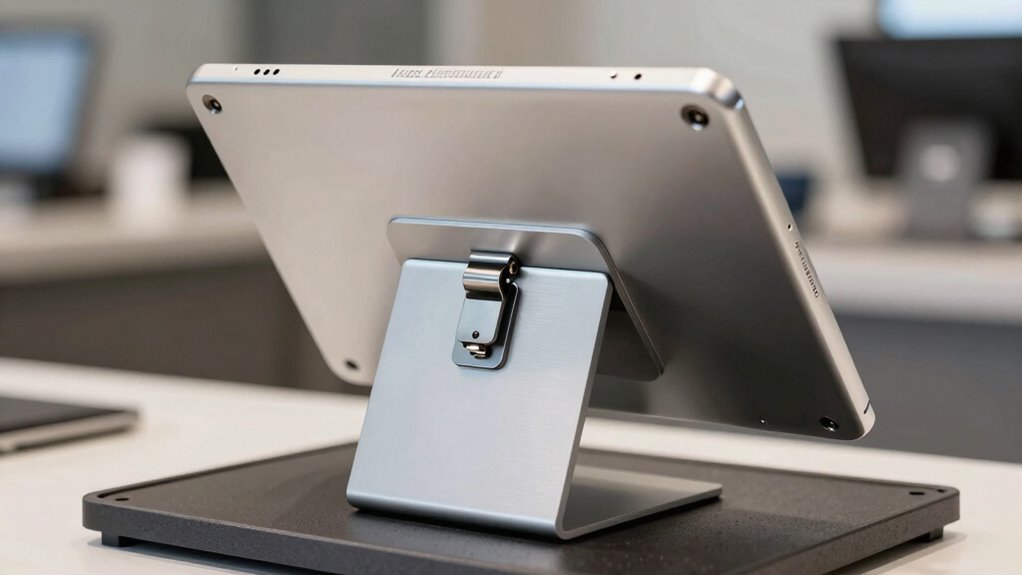
Finding the right locking enclosure for an iPad POS system is essential for retail, hospitality, or medical environments where security matters. The CTA Locking Tablet Mount stands out for its versatility and integrated USB hub, making it ideal for busy retail counters. For medical settings, the CTA Security Enclosure for Medical Environments offers tailored safety and compliance. Meanwhile, the AboveTEK Anti-Theft iPad Kiosk Stand combines security with flexible positioning, perfect for high-traffic areas. These options highlight the core tradeoffs: balancing security, usability, and compatibility. Keep reading for a detailed comparison to find the best fit for your needs.

Get smart everyday buys delivered free with Prime
- Fast, free delivery on millions of items
- Prime Video, Amazon Music and more included
- Member-only deals all year
Key Takeaways
- The top enclosures combine security with ease of access, but often trade off between robustness and user convenience.
- Versatility, such as adjustable mounts and 360° rotation, is a key factor for environments needing flexible positioning.
- Compatibility varies, so matching the enclosure to your specific iPad model and environment is critical.
- Build quality and materials greatly influence durability, especially in high-traffic or medical settings.
- Pricing reflects features like integrated USB hubs, tamper-proof designs, and mounting options; higher cost often means more advanced security features.
| CTA Digital Desktop Anti-Theft Stand for iPad 11th Gen, Air 4 & 5, 10th Gen, Pro 11″ – Black |  | Best Overall for Versatile Security and Flexibility | Dimensions: 10.8″H x 11.5″W x 6.3″D | Compatible Devices: iPad 11th Gen A16, iPad Air 11″ M2, iPad Pro 11″ M4, iPad 10th Gen | VIEW ON AMAZON | See Our Full Breakdown | |
| CTA Locking Tablet Mount with USB Hub & Enclosure for iPad and Tablets |  | Best for Adjustable Positioning and Universal Compatibility | Material: Heavy-duty enclosure | Tilt Range: 180 degrees | Rotation: 135 degrees | VIEW ON AMAZON | See Our Full Breakdown |
| CTA Security Enclosure for Medical Environments, Compatible with 10.2″ iPad (7th-9th), 11″ iPad Pro (2018/2020/2022), and 10.5″ iPad Air (2019) – White |  | Best for Healthcare Settings with Compatibility Needs | Compatibility: iPad 10.2″ (7th-9th), 11″ iPad Pro, 10.5″ iPad Air | VESA Mounting: 75mm x 75mm | Material: Medical grade | VIEW ON AMAZON | See Our Full Breakdown |
| iPad Security Enclosure by Maclocks – All-in-One Countertop Secure Interactive Unit, Black |  | Best for Interactive Public Displays with Full Rotation | Compatibility: iPad 1/2/3/4, iPad Air/Air 2, Pro 9.7 | Rotation: 360-degree | Features: Continuous charging, tamper-proof screws | VIEW ON AMAZON | See Our Full Breakdown |
| AboveTEK Universal Tablet Wall Mount with Locking Enclosure for 9.7-13 inch Devices |  | Best for Heavy-Duty Commercial Installations | Device Compatibility: 9.7″ to 13″ tablets | Maximum Thickness: 0.47 inches | VESA Pattern: 100x100mm | VIEW ON AMAZON | See Our Full Breakdown |
| Desktop Anti-Theft Security Kiosk Stand Holder for 10.2-inch iPad (2019-2021) with Flip & 360° Swivel |  | Best for Flexible Viewing and Secure Countertop Use | Compatible Models: 10.2-inch iPad 7th-9th Gen (2019-2021) | Rotation: 360° swivel | Material: Solid steel with aluminum | VIEW ON AMAZON | See Our Full Breakdown |
| Desktop Anti-Theft Security Kiosk Stand Holder Enclosure for iPad 10.2-Inch (9th Gen, 8th Gen, 7th Gen) with Lock and 360° Rotation |  | Best for Durable, Adjustable Desktop Security for Specific iPad Models | Model Compatibility: iPad 10.2-inch 7th-9th Gen | Rotation: 360° | Material: Aluminum | VIEW ON AMAZON | See Our Full Breakdown |
| AboveTEK Anti-Theft iPad Kiosk Stand with 360° Swivel & Tilt |  | Best for Multi-Device Compatibility and Tilt Flexibility | Compatibility: Select iPads and Samsung Galaxy tablets | Rotation: 360° | Tilt: 75° | VIEW ON AMAZON | See Our Full Breakdown |
| AboveTEK Anti-Theft Tablet Stand – iPad Locking & Security Stand, Countertop & Wall Mount POS Stand, 360° Swivel Kiosk Stand for iPad/iPad Air/iPad Pro – Ideal for Retail Business (Black) |  | Best for Wide Compatibility and Wall or Counter Mounting | Compatibility: iPad, iPad Air, iPad Pro up to 10.5 inches | Rotation: 360° | Mounting Options: Countertop & wall mount | VIEW ON AMAZON | See Our Full Breakdown |
| Mount-It! iPad Kiosk Stand, Anti-Theft Steel Countertop Enclosure, Black |  | Best for High-Traffic, Heavy-Duty Security Needs | Material: Steel | Color: Black | Compatibility: Various iPad models | VIEW ON AMAZON | See Our Full Breakdown |
| locking enclosure for ipad po | Material | Rotation | Compatibility |
|---|---|---|---|
| CTA Digital Desktop Anti-Theft | — | — | — |
| CTA Locking Tablet Mount with | Heavy-duty enclosure | 135 degrees | — |
| CTA Security Enclosure for Med | Medical grade | — | iPad 10.2" (7th-9th), 11" iPad Pro, 10.5" iPad Air |
| iPad Security Enclosure by Mac | — | 360-degree | iPad 1/2/3/4, iPad Air/Air 2, Pro 9.7 |
| AboveTEK Universal Tablet Wall | Aluminum and steel | 360° | — |
| Desktop Anti-Theft Security Ki | Solid steel with aluminum | 360° swivel | — |
| Desktop Anti-Theft Security Ki | Aluminum | 360° | — |
| AboveTEK Anti-Theft iPad Kiosk | Metal | 360° | Select iPads and Samsung Galaxy tablets |
| AboveTEK Anti-Theft Tablet Sta | All-metal | 360° | iPad, iPad Air, iPad Pro up to 10.5 inches |
| Mount-It! iPad Kiosk Stand | Steel | 360° | Various iPad models |
More Details on Our Top Picks
CTA Digital Desktop Anti-Theft Stand for iPad 11th Gen, Air 4 & 5, 10th Gen, Pro 11″ – Black
This stand stands out for combining a sturdy locking aluminum enclosure with a highly adaptable display setup. Its 360-degree rotation and adjustable orientation make it ideal for retail or public-facing environments where both security and flexibility matter. Compared with the CTA Locking Tablet Mount, it offers more comprehensive display options but is bulkier, which could be a concern in tight spaces. The enclosure’s secure lock prevents theft, while access to ports and buttons remains straightforward, ensuring usability isn’t sacrificed for security. The tradeoff is that its size and installation complexity might not suit small or discreet setups. Overall, this pick makes the most sense for users who need a durable, flexible solution that can handle high-traffic areas.
Pros:- Secure locking enclosure prevents theft
- Easy access to all ports and buttons
- Flexible display options with 360-degree rotation
Cons:- May be bulky for small spaces
- Requires proper installation for security
Best for: Retail businesses needing secure, flexible kiosks in busy environments
Not ideal for: Small retail spaces or home use where space is limited and simplicity is preferred
- Dimensions:10.8″H x 11.5″W x 6.3″D
- Compatible Devices:iPad 11th Gen A16, iPad Air 11″ M2, iPad Pro 11″ M4, iPad 10th Gen
Our verdict“This stand is perfect for retail or public settings where security and display flexibility are priorities.”
CTA Locking Tablet Mount with USB Hub & Enclosure for iPad and Tablets
This model excels in offering a highly adjustable mount with tilt and rotation—180 degrees tilt and 135 degrees rotation—making it a top choice for dynamic environments. It compares favorably against the AboveTEK Universal Tablet Wall Mount when flexibility is a priority, though it requires an Allen wrench for adjustments, which may slow setup. Its heavy-duty enclosure protects against tampering, and the inclusion of a USB hub adds functionality for peripherals or charging. However, its weight and the need for tools can complicate installation, especially in fast-paced settings. This pick is best suited for users who want a versatile, durable mount that can accommodate different tablet models and orientations.
Pros:- Adjustable tilt and rotation for versatile viewing
- Compatible with a wide range of tablets
- Includes a USB hub for added connectivity
Cons:- Requires an Allen wrench for adjustments
- Heavy and potentially bulky for some setups
Best for: Healthcare facilities or team environments needing adaptable, multi-device mounts
Not ideal for: Casual or single-use setups that require quick, tool-free installation
- Material:Heavy-duty enclosure
- Tilt Range:180 degrees
- Rotation:135 degrees
- Warranty:1 year
Our verdict“Ideal for environments needing flexible, multi-angle tablet mounts with added connectivity options.”
CTA Security Enclosure for Medical Environments, Compatible with 10.2″ iPad (7th-9th), 11″ iPad Pro (2018/2020/2022), and 10.5″ iPad Air (2019) – White
This enclosure is tailored specifically for medical environments, with materials that meet healthcare standards. It supports multiple iPad models, including 10.2-inch, 11-inch iPad Pro, and 10.5-inch iPad Air, providing broad device compatibility. Unlike the Maclocks Enclosure, it offers foam padding and customizable stoppers, enhancing device protection during frequent sanitization or handling. The VESA 75mm x 75mm mounting option adds installation versatility. The tradeoff is that it lacks access to the back camera for certain iPads and is limited to specific models, which could restrict future device upgrades. This pick makes sense for healthcare providers seeking a secure, hygienic mounting solution for multiple device types.
Pros:- Supports multiple iPad models
- Medical-grade materials ensure hygiene and durability
- VESA mounting provides versatile installation
Cons:- No back camera access for some models
- Limited to specific iPad sizes and models
Best for: Hospitals or clinics needing secure, hygienic iPad mounting with broad device compatibility
Not ideal for: General retail or public spaces where aesthetic or camera access is more critical
- Compatibility:iPad 10.2″ (7th-9th), 11″ iPad Pro, 10.5″ iPad Air
- VESA Mounting:75mm x 75mm
- Material:Medical grade
- Warranty:1 year
Our verdict“This enclosure suits healthcare environments requiring secure, hygienic, multi-model device mounting.”
iPad Security Enclosure by Maclocks – All-in-One Countertop Secure Interactive Unit, Black
This enclosure is designed for interactive retail or informational displays, with a full 360-degree rotation feature that surpasses many basic mounts like the AboveTEK Wall Mount. Its tamper-proof screws and continuous charging capability provide a secure, ready-to-use kiosk solution. Compared to simpler enclosures, it offers a more engaging user experience thanks to its rotation, but the security cable lock requirement adds an extra layer of complexity. The model’s compatibility is somewhat limited, focusing on older iPad models, which could be a drawback as devices evolve. This option makes the most sense for businesses seeking an engaging, secure, and continuously powered iPad setup for public interaction.
Pros:- Tamper-proof security screws
- 360-degree rotation for versatile engagement
- Supports continuous charging
Cons:- Limited to specific iPad models
- Requires security cable lock for added security
Best for: Retail or public service environments needing secure, interactive displays
Not ideal for: Home or casual use where high security and full rotation are unnecessary
- Compatibility:iPad 1/2/3/4, iPad Air/Air 2, Pro 9.7
- Rotation:360-degree
- Features:Continuous charging, tamper-proof screws
Our verdict“Perfect for businesses that want a secure, interactive, and fully rotatable iPad display solution.”
AboveTEK Universal Tablet Wall Mount with Locking Enclosure for 9.7-13 inch Devices
This wall mount offers robust security with a tamper-proof lock system and a universal compatibility range covering tablets from 9.7 to 13 inches. Its heavy-duty aluminum and steel construction ensures durability, and the adjustable swivel and tilt (360° and -30° to +30°) allow for precise viewing angles. Compared with the CTA Desktop Stand, it’s designed for permanent wall installations, making it ideal for high-traffic or industrial environments. The main tradeoff is that its installation requires tools and effort, and it may be over-engineered for casual or home use. This mount makes the most sense for businesses seeking a secure, adaptable, and long-lasting wall-mounted tablet solution.
Pros:- Secure anti-theft locking system
- Universal compatibility with various tablets
- Adjustable swivel and tilt for optimal viewing
Cons:- Requires tools for installation
- May be excessive for casual or infrequent use
Best for: Commercial spaces needing durable, adjustable wall-mounted tablet security
Not ideal for: Home or light-use environments where easy setup and portability matter more
- Device Compatibility:9.7″ to 13″ tablets
- Maximum Thickness:0.47 inches
- VESA Pattern:100x100mm
- Material:Aluminum and steel
- Rotation:360°
- Tilt:-30° to +30°
Our verdict“Best suited for industrial or high-traffic environments requiring durable, secure wall mounting.”
Desktop Anti-Theft Security Kiosk Stand Holder for 10.2-inch iPad (2019-2021) with Flip & 360° Swivel
This sturdy steel kiosk stand offers a reliable solution for securing 10.2-inch iPads, particularly for retail or event environments where flexibility matters. Its 360-degree swivel and flip feature provide impressive viewing versatility, making it easier for users to adjust angles on the spot. Compared with the AboveTEK Anti-Theft iPad Kiosk Stand, this model’s sturdy steel construction emphasizes durability over lighter materials, though the base design limits some rotational options since it doesn’t rotate itself. The lock system enhances theft protection, but its fixed base could restrict certain installations or angles. Overall, this stand makes the most sense for businesses prioritizing security and adjustable viewing within a fixed countertop setup, especially where device size compatibility is narrow.
Pros:- Secure lock system prevents theft
- Flexible flip and 360-degree swivel for user comfort
- Sturdy steel construction offers durability
- Pre-drilled holes simplify installation
Cons:- Limited to 10.2-inch iPad model compatibility
- Base does not rotate, restricting some viewing angles
Best for: Retail stores or event spaces needing a secure, adjustable stand for 10.2-inch iPads
Not ideal for: Environments requiring full 360-degree rotation of the entire stand or flexible base movement, since the base does not rotate
- Compatible Models:10.2-inch iPad 7th-9th Gen (2019-2021)
- Rotation:360° swivel
- Material:Solid steel with aluminum
- Lock System:Key lock
- Installation:Pre-drilled holes
Our verdict“This stand suits high-traffic retail or event spaces where security and flexible viewing angles are priorities, and device size is fixed.”
Desktop Anti-Theft Security Kiosk Stand Holder Enclosure for iPad 10.2-Inch (9th Gen, 8th Gen, 7th Gen) with Lock and 360° Rotation
Compared with the steel stand, this aluminum enclosure offers a lighter yet robust option for securing iPad 10.2-inch models, with a focus on adjustable viewing angles thanks to its 360-degree rotation. Its aluminum build provides a wobble-free experience, making it especially suitable for environments where stability is key, such as retail counters or kiosks. However, it’s limited to specific model compatibility, which means buyers need to double-check their device before purchasing—unlike the more universal Mount-It! iPad Kiosk Stand. The lock and easy installation make it a practical choice, but the fixed base can restrict some positioning options. Overall, this pick is ideal for those needing a durable, adjustable stand tailored to certain iPads, rather than a universal solution.
Pros:- Secure lock and key prevent theft
- Adjustable 360-degree rotation for flexible viewing
- Lightweight aluminum construction resists wobbling
- Easy to install on any desktop
Cons:- Compatibility limited to specific iPad models
- Base does not rotate, restricting some positioning options
Best for: Retail or hospitality businesses using compatible iPad 10.2-inch models that need adjustable, secure mounting
Not ideal for: Owners of different iPad models or those seeking a universal stand, as model-specific compatibility limits its use
- Model Compatibility:iPad 10.2-inch 7th-9th Gen
- Rotation:360°
- Material:Aluminum
- Lock:Yes
- Base:Predrilled holes for secure installation
Our verdict“This enclosure is best suited for businesses with specific iPad models needing a stable, adjustable security mount.”
AboveTEK Anti-Theft iPad Kiosk Stand with 360° Swivel & Tilt
This heavy-duty stand stands out for supporting a variety of tablets, including multiple iPad generations and Samsung Galaxy devices, making it highly versatile. Its 360-degree swivel coupled with a 75-degree tilt provides a broad range of viewing angles, perfect for retail or hospitality settings where device variety is common. Compared to the Mount-It! iPad Kiosk Stand, this model’s tilt feature offers additional angle customization, but its weight and bulk may make it less ideal for environments with limited space or frequent repositioning. The lock and key security system enhance theft deterrence, though the device compatibility list means some larger or newer iPads might not fit. It’s best suited for businesses managing multiple device types needing flexible, secure mounts.
Pros:- Supports multiple tablet brands and models
- 360° swivel and 75° tilt for flexible positioning
- Heavy-duty metal construction for stability
- Includes cable management for a clean look
Cons:- Heavy weight may complicate repositioning
- Device compatibility limited to supported models
Best for: Businesses with multiple tablet models or requiring tilt adjustments for customer-facing displays
Not ideal for: High-traffic, space-constrained environments where frequent repositioning or lighter setups are preferred
- Compatibility:Select iPads and Samsung Galaxy tablets
- Rotation:360°
- Tilt:75°
- Material:Metal
- Security:Lock and key system
Our verdict“Ideal for multi-device setups where tilt flexibility and security are needed, especially in versatile retail environments.”
AboveTEK Anti-Theft Tablet Stand – iPad Locking & Security Stand, Countertop & Wall Mount POS Stand, 360° Swivel Kiosk Stand for iPad/iPad Air/iPad Pro – Ideal for Retail Business (Black)
This versatile stand provides a comprehensive solution for securing multiple iPad models, including the iPad Air and Pro series, with options for both countertop and wall mounting. Its 360-degree swivel allows quick adjustments, making it suitable for dynamic retail or service environments. Compared to the Mount-It! iPad Kiosk Stand, this model emphasizes compatibility with a wider range of iPads but does not specify materials or weight, which could affect stability. The lock and key system enhances security, and the cable management keeps workspaces tidy. However, its size limits use to models under 10.5 inches, excluding larger iPads. This makes it a flexible, professional choice for businesses needing multi-model support with mounting options.
Pros:- Supports multiple iPad and iPad Pro models
- Countertop and wall mount options
- 360° swivel for quick adjustments
- Lock and key security system
Cons:- Limited to iPads under 10.5 inches
- Size and weight may affect ease of repositioning
Best for: Retailers or cafes with varied iPad models needing wall or counter mounting
Not ideal for: Environments with larger iPads or where space is tight, as compatibility excludes bigger models
- Compatibility:iPad, iPad Air, iPad Pro up to 10.5 inches
- Rotation:360°
- Mounting Options:Countertop & wall mount
- Security:Lock and key
- Material:All-metal
Our verdict“Best suited for multi-model environments where flexible mounting and security are key, but larger iPads are not supported.”
Mount-It! iPad Kiosk Stand, Anti-Theft Steel Countertop Enclosure, Black
This steel enclosure from Mount-It! emphasizes rugged durability and high security for environments like busy retail counters or trade shows. Its multiple mounting options and adjustable orientation offer flexibility, but as a bare enclosure, it requires additional accessories for complete setup. Compared with the AboveTEK Anti-Theft iPad Kiosk Stand, this model’s steel construction provides extra strength, though at the cost of added weight and potential difficulty in repositioning. Its compatibility with a range of iPad models makes it versatile, but it’s not suitable for larger or case-equipped devices without modifications. This stand is best for high-traffic settings demanding maximum theft protection and stability over portability.
Pros:- Secure anti-theft steel enclosure
- Adjustable orientation and rotation
- Strong steel construction for durability
- Multiple mounting options for versatile setup
Cons:- Requires additional mounting hardware and setup
- Compatibility limited to specific iPad models, no cases
Best for: High-traffic environments needing a durable, secure, and versatile mounting solution for iPads
Not ideal for: Smaller businesses or setups with limited space, as the stand is bulky and requires additional installation effort
- Material:Steel
- Color:Black
- Compatibility:Various iPad models
- Dimensions:11.8″ x 7.9″
- Mounting Options:Freestanding or bolt-down
- Rotation:360°
Our verdict“This enclosure excels in heavy-use settings where maximum security and durability outweigh portability concerns.”

How We Picked
The products were evaluated based on several key criteria including security features, build quality, compatibility with various iPad models, ease of installation, and overall value. We prioritized options that balance protection with usability, as a locking enclosure must both secure the device and allow quick access for users. Durability, flexibility in mounting options, and additional features like USB hubs or medical-grade compliance also influenced rankings. Products were ranked after comparing these factors within their intended use cases, ensuring a mix of versatile, premium, and budget-friendly options to meet diverse buyer needs.| locking enclosure for ipad po | Compatibility |
|---|---|
| CTA Digital Desktop Anti-Theft | — |
| CTA Locking Tablet Mount with | — |
| CTA Security Enclosure for Med | iPad 10.2" (7th-9th), 11" iPad Pro, 10.5" iPad Air |
| iPad Security Enclosure by Mac | iPad 1/2/3/4, iPad Air/Air 2, Pro 9.7 |
| AboveTEK Universal Tablet Wall | — |
| Desktop Anti-Theft Security Ki | — |
| Desktop Anti-Theft Security Ki | — |
| AboveTEK Anti-Theft iPad Kiosk | Select iPads and Samsung Galaxy tablets |
| AboveTEK Anti-Theft Tablet Sta | iPad, iPad Air, iPad Pro up to 10.5 inches |
| Mount-It! iPad Kiosk Stand | Various iPad models |
Factors to Consider When Choosing Locking Enclosure For Ipad Pos
Choosing the right locking enclosure for an iPad POS system involves understanding several important factors. A well-selected enclosure not only secures your device but also influences ease of use, installation, and maintenance. Considering these factors helps avoid common pitfalls like overpaying for unnecessary features or selecting incompatible models. Below are key considerations to keep in mind to ensure you pick an enclosure that fits your environment and operational needs.Security Features and Build Quality
Security is paramount in POS environments, so look for enclosures made from durable materials like steel or reinforced plastics. Tamper-proof locks and anti-theft features prevent theft and vandalism. However, higher security often means more complex installation or heavier units, so balance security with ease of access for authorized users. In high-risk areas, investing in rugged, tamper-resistant enclosures can save costs long-term by reducing device replacements.
Compatibility and Size
Matching the enclosure to your specific iPad model is vital. Different models vary in size and port placement, so verify compatibility before purchasing. Some enclosures are adjustable or universal, offering flexibility across multiple models, which can be more cost-effective. Failing to match size can lead to frustration or frequent replacement, especially if the enclosure is too tight or loose.
Mounting Options and Flexibility
Decide whether you need a countertop stand, wall mount, or kiosk style. Adjustable mounts, swivel, or 360° rotation features enhance usability, especially in retail or service settings where customer interaction occurs. Consider environmental factors—such as space constraints or the need for mobility—and choose mounting options that optimize workflow without sacrificing security.
Ease of Installation and Maintenance
An enclosure should be straightforward to install and remove for maintenance or upgrades. Overly complex locking mechanisms or heavy units can increase setup time and maintenance costs. Look for designs with tool-less access or quick-release features if frequent servicing is expected. Regular cleaning and checks are easier when access is simple but still secure enough to prevent tampering.
Additional Features and Cost
Features like integrated USB hubs, adjustable angles, or medical-grade certifications add value but also increase price. Determine which features are necessary for your environment—extra connectivity for peripherals or compliance with industry standards can justify higher costs. Be cautious of overpaying for features that won’t be used regularly, and focus on core security and compatibility to maximize your investment.
Frequently Asked Questions
Can I use a universal locking enclosure for different iPad models?
Yes, many enclosures are designed to be adjustable or universal, accommodating multiple iPad sizes. However, it’s important to verify the specific model compatibility and dimensions to ensure a snug fit. An adjustable enclosure offers flexibility, especially if you plan to upgrade or change devices frequently. Keep in mind that overly generic models might compromise security or ease of access, so choose one that balances compatibility with durability.
Are there locking enclosures suitable for medical environments?
Absolutely. Some enclosures are specifically designed for medical settings, featuring sterilizable materials, tamper-proof locks, and compliance with health standards. These enclosures often have features like sealed surfaces for easy cleaning and tamper-resistant security. Selecting a medical-grade enclosure can help meet strict regulatory standards while keeping sensitive devices protected.
What installation options are available for countertop enclosures?
Countertop enclosures typically come with mounting options like clamp mounts, weighted bases, or adhesive pads. Some offer 360° swivel or tilt features for optimal positioning. When choosing, consider your countertop space and whether you need mobility or fixed stability. Ease of installation varies, so look for models that require minimal tools and straightforward setup procedures to save time and effort.
How secure are wall-mounted locking enclosures?
Wall-mounted enclosures generally provide high security, especially if made from reinforced steel and equipped with tamper-proof locks. They prevent theft and accidental dislodging, but installation must be solid to avoid weakening the security. Proper anchoring and lock quality are critical—poor installation or low-quality locks can undermine security, so choose trusted brands and professional installation if needed.
Is it worth paying extra for features like integrated USB hubs?
Integrated USB hubs can streamline peripheral connections, reducing clutter and improving usability. If your POS system relies on multiple accessories, this feature adds significant convenience. However, they often come at a higher price, so consider whether the added connectivity will genuinely improve your workflow. If you rarely connect peripherals, investing in a basic enclosure with external hub options might be more cost-effective.
Conclusion
For retail environments where security and ease of access are priorities, the CTA Locking Tablet Mount offers a versatile, all-in-one solution. Medical facilities should consider the CTA Security Enclosure for Medical Environments for compliance and safety, while high-traffic areas may benefit from the AboveTEK Anti-Theft iPad Kiosk Stand for flexibility and durability. Budget-conscious buyers will find good value in adjustable, universal options, whereas premium users might prefer enclosures with integrated features like USB hubs or tamper-proof locks. Ultimately, matching the enclosure to your specific environment, device, and security needs ensures the best return on your investment.