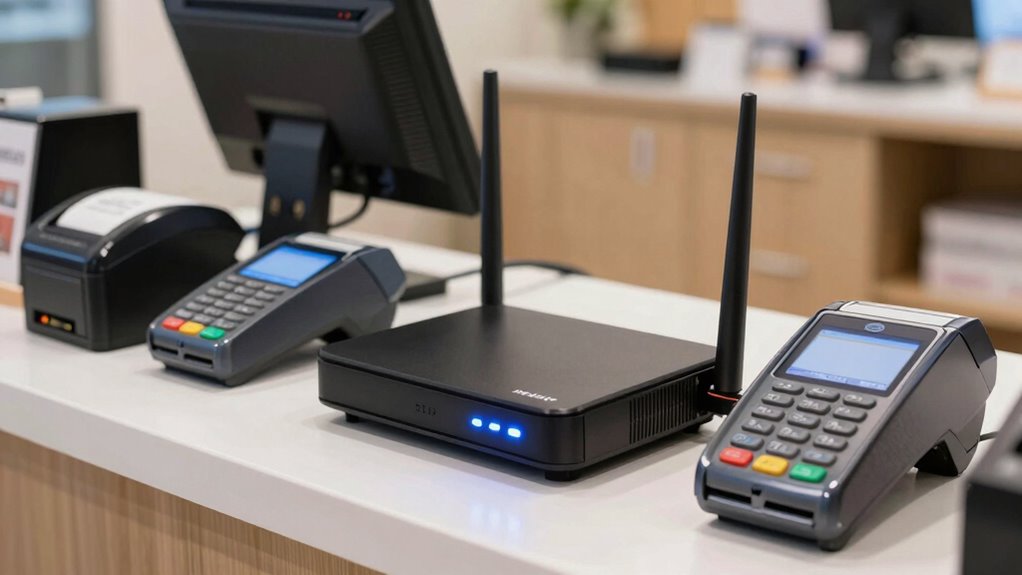

Choosing a router for small business POS systems comes down to one question: how much downtime can your checkout tolerate? The D-Link Guardian 700 Pro (DBR-700) is my best overall pick because it combines multi-WAN failover, an SPI firewall, and 2.5GbE LAN ports with SFP uplinks — the exact mix a busy POS environment needs to stay online and process card payments without hiccups. If your building lacks reliable wired broadband, the InHand Networks 5G Indoor CPE offers cellular connectivity as a primary or backup link, while the D-Link Guardian 600 PoE delivers similar failover protection with power-over-Ethernet for tidy counter installations. The main tradeoff in this category is between wired business-grade reliability and cellular flexibility, plus how much management complexity you’re willing to take on. Keep reading for the full breakdown of all six options.

Get smart everyday buys delivered free with Prime
- Fast, free delivery on millions of items
- Prime Video, Amazon Music and more included
- Member-only deals all year
Key Takeaways
- Multi-WAN failover was the single biggest differentiator: the D-Link Guardian 600 and 700 Pro can switch between two wired ISPs automatically, which matters more for payment uptime than raw WiFi speed.
- Cellular routers (the InHand 5G Indoor CPE and IR624) solve a different problem than wired routers — they belong in stores where broadband is unreliable or unavailable, not as a like-for-like swap.
- The NETGEAR RS140 is the only consumer-adjacent pick here; it’s fast and easy but lacks the dual-WAN failover and PoE features that POS-critical networks typically demand.
- The ADTRAN NetVanta 3200 is a legacy T1 modular router — it made the list for businesses still running older leased-line infrastructure, but most new POS deployments should skip it.
- PoE support on the Guardian 600 quietly changes installation cost, letting you power access points or IP phones from the router instead of adding separate switches.
| D-Link Guardian 600 PoE Multi-Gig Business Router (DBR-600-P) |  | Best Overall | LAN Ports: 8x 2.5GbE PoE+ (30 W each, 123 W total) | WAN Ports: 2.5GbE with multi-WAN failover | PoE Support: PoE+ on all LAN ports | VIEW ON AMAZON | See Our Full Breakdown |
| ADTRAN 4200862L1 NetVanta 3200 Modular Access Router |  | Best for Legacy T1 Branch Circuits | WAN Interface: T1/FT1 via NIM module | Protocols: Frame relay, PPP | Form Factor: Desktop, modular access router | VIEW ON AMAZON | See Our Full Breakdown |
| NETGEAR Nighthawk WiFi 7 Router RS140 |  | Best Budget-Friendly Pick for Wireless-First Counters | Wireless Standard: WiFi 7 dual-band (2.4/5 GHz) | Top Wireless Speed: Up to 5 Gbps | Coverage: Up to 2,250 sq ft, 80 devices | VIEW ON AMAZON | See Our Full Breakdown |
| InHand Networks 5G Router Indoor CPE WiFi6 AX5400 |  | Best Cellular Failover and Backup Broadband | Cellular: 5G SA/NSA, downlink up to 2.6 Gbps (Qualcomm X62) | Wireless: Wi-Fi 6 AX5400 dual-band | Ethernet Ports: 3 total, including 1x 2.5GbE WAN/LAN and 1x 1GbE | VIEW ON AMAZON | See Our Full Breakdown |
| InHand Networks IR624 Industrial 5G Cellular Router |  | Best Rugged Pick for Kiosks and Harsh Sites | Cellular: 5G downlink up to 3.4 Gbps, dual Nano-SIM failover | Ethernet: 4x Gigabit ports, WAN/LAN/VLAN configurable, 1.5kV isolation | Serial Interfaces: 1x RS232, 1x RS485 (15kV ESD protection) | VIEW ON AMAZON | See Our Full Breakdown |
| D-Link Guardian 700 Pro Multi-Gig Business Router with SFP (DBR-700) |  | Best Premium Pick | LAN Ports: 7x 2.5GbE plus 1 shared LAN/WAN port | WAN Ports: 2.5GbE WAN | Uplink: 2.5GbE/1GbE SFP fiber port | VIEW ON AMAZON | See Our Full Breakdown |
| router for small business pos system | VPN | LAN Ports | Wireless |
|---|---|---|---|
| D-Link Guardian 600 PoE Multi- | Up to 50 tunnels (IPSec, WireGuard, OpenVPN) | 8x 2.5GbE PoE+ (30 W each, 123 W total) | — |
| ADTRAN 4200862L1 NetVanta 3200 | — | — | None |
| NETGEAR Nighthawk WiFi 7 Route | — | 3x 1 Gig Ethernet | — |
| InHand Networks 5G Router Indo | IPsec, L2TP | — | Wi-Fi 6 AX5400 dual-band |
| InHand Networks IR624 Industri | IPsec, L2TP | — | Wi-Fi 5 |
| D-Link Guardian 700 Pro Multi- | Up to 100 tunnels (IPSec, PPTP, L2TP, OpenVPN, WireGuard) | 7x 2.5GbE plus 1 shared LAN/WAN port | — |
More Details on Our Top Picks
D-Link Guardian 600 PoE Multi-Gig Business Router (DBR-600-P)
The Guardian 600 earns the top spot because it solves the two problems that actually break POS systems: power and uptime. With eight 2.5GbE PoE+ ports, a single cable can run a POS terminal, an access point, and an IP camera — which means fewer boxes, fewer outlets, and fewer points of failure behind the counter. Multi-WAN failover keeps card transactions flowing if the primary line drops, and the built-in SPI firewall plus VPN support covers compliance-adjacent security without a subscription.
Compared with the D-Link Guardian 700 Pro, the 600 trades the SFP fiber port for PoE output, which is the smarter trade for a café or retail floor where you’re powering devices rather than backhauling fiber. The tradeoff is a 123 W total PoE budget that caps how many powered terminals you can stack.
Pros:- Eight 2.5GbE PoE+ ports power POS terminals and cameras over existing cabling
- Multi-WAN failover keeps payment processing alive during ISP outages
- Built-in VPN (up to 50 tunnels, IPSec/WireGuard/OpenVPN) with no subscription
- NDAA/TAA compliant with limited lifetime coverage in North America
Cons:- Total PoE budget of 123 W limits how many high-draw devices you can power at once
- No SFP fiber port, so multi-gig fiber backhaul requires the step-up Guardian 700 Pro
Best for: Café, clinic, or retail owners who want one router to power and protect wired POS hardware, cameras, and phones without an IT staff or recurring fees
Not ideal for: Businesses that need fiber WAN uplinks or a larger PoE budget — the Guardian 700 Pro with SFP is the better fit there
- LAN Ports:8x 2.5GbE PoE+ (30 W each, 123 W total)
- WAN Ports:2.5GbE with multi-WAN failover
- PoE Support:PoE+ on all LAN ports
- VPN:Up to 50 tunnels (IPSec, WireGuard, OpenVPN)
- Security:SPI firewall, WPA3
- Compliance:NDAA/TAA compliant
- Warranty:Limited lifetime (North America)
Our verdict“If you run a single-location business with multiple wired POS and camera drops, this is the most complete plug-in-and-forget choice on the list.”
ADTRAN 4200862L1 NetVanta 3200 Modular Access Router
The NetVanta 3200 exists on this list for one narrow reason: some small businesses are still anchored to T1/FT1 circuits, and almost no modern router includes that interface. Its modular design accepts a T1 NIM, and it handles frame relay and PPP — legacy connectivity that the D-Link Guardian 600 simply cannot touch. For a business locked into an older telecom contract or a rural location where T1 remains the only dependable circuit, that compatibility is the whole purchase decision.
The honest tradeoff is everything else. There’s no Wi-Fi, no PoE, no multi-gig Ethernet, and no modern VPN stack. Where the Guardian 600 consolidates routing, power, and security in one box, the NetVanta 3200 does a single dated job and expects you to fill the gaps with separate hardware. Anyone not specifically needing T1 should treat this as a niche part, not a contender.
Pros:- Native T1/FT1 support via modular NIM slot
- Handles frame relay and PPP for legacy WAN links
- Modular chassis allows targeted hardware configuration
- Proven ADTRAN telecom-grade platform for branch deployments
Cons:- No Wi-Fi, PoE, or multi-gig Ethernet — dated feature set by modern standards
- Requires separate hardware for security and wireless, adding cost and complexity
Best for: Businesses tied to existing T1/FT1 telecom circuits or frame relay links that need a drop-in replacement router for legacy branch connectivity
Not ideal for: Anyone on cable, fiber, or DSL — this router offers none of the PoE, Wi-Fi, or failover features modern POS setups depend on
- WAN Interface:T1/FT1 via NIM module
- Protocols:Frame relay, PPP
- Form Factor:Desktop, modular access router
- Platform:ADTRAN NetVanta 3200 series
- Wireless:None
- PoE:None
Our verdict“Buy this only if a T1 circuit is part of your reality; every other reader should move to a modern option like the Guardian 600.”
NETGEAR Nighthawk WiFi 7 Router RS140
The Nighthawk RS140 is the value play for small businesses whose POS hardware connects over Wi-Fi — tablet-based registers, wireless card readers, and handheld terminals. Its WiFi 7 dual-band throughput handles up to 80 concurrent devices across roughly 2,250 sq ft, which comfortably covers a boutique or quick-service restaurant, and the 2.5G WAN port keeps multi-gig fiber plans from going to waste.
Where it falls short of the D-Link Guardian 600 is business continuity and wired capacity: with only three 1G LAN ports and no PoE, you can’t power cameras or wired terminals from it, and there’s no multi-WAN failover when your ISP blinks. The security posture also leans on a subscription after the trial period, unlike D-Link’s no-fee approach. As a primary router for a mission-critical payment network, that’s a real gap — as an affordable wireless hub for a light-duty counter, it’s hard to argue with.
Pros:- WiFi 7 with MU-MIMO and OFDMA supports up to 80 wireless devices
- 2.5G WAN port takes advantage of multi-gig internet plans
- Nighthawk app enables remote setup, guest networks, and device management
- Automatic firmware updates and out-of-the-box security features
Cons:- Only three 1G LAN ports and no PoE limits wired POS expansion
- Strongest security features require an ongoing subscription after the trial
- No multi-WAN or cellular failover for business continuity
Best for: Small shops and cafés running wireless tablet POS systems that want fast Wi-Fi and app-based management without business-router pricing
Not ideal for: Operations that can’t tolerate downtime — no WAN failover means an ISP outage stops payment processing entirely
- Wireless Standard:WiFi 7 dual-band (2.4/5 GHz)
- Top Wireless Speed:Up to 5 Gbps
- Coverage:Up to 2,250 sq ft, 80 devices
- WAN Port:1x 2.5 Gig Ethernet
- LAN Ports:3x 1 Gig Ethernet
- Management:Nighthawk app (iOS/Android)
- Security:Advanced Router Protection; Armor subscription available
Our verdict“A sensible budget router for wireless-first counters, as long as you accept that a single ISP outage takes your payments down with it.”
InHand Networks 5G Router Indoor CPE WiFi6 AX5400
For a POS system, the scariest failure isn’t slow Wi-Fi — it’s a dead line during the lunch rush. The InHand CPE02 attacks that directly: certified for Verizon, AT&T, and T-Mobile, it can serve as your primary 5G connection or automatically fail over from wired broadband, which is exactly the continuity feature the Nighthawk RS140 lacks. The Qualcomm X62 radio delivers downlink speeds up to 2.6 Gbps, the 2.5GbE port keeps wired terminals fast, and InCloud Manager allows zero-touch remote deployment across multiple locations without an on-site visit.
The tradeoffs are structural. Ongoing cellular data costs can rival a wired line if 5G is your only link, LAN capacity is thin next to the Guardian 600’s eight PoE ports, and MVNO SIMs may need manual APN entry. Think of this as resilience hardware first and a router second.
Pros:- Carrier-certified 5G with automatic failover and load balancing
- 2.5GbE WAN/LAN port maximizes real-world cellular throughput
- Zero-touch cloud management via InCloud Manager for multi-site control
- Thermally designed to avoid heat-related throttling during sustained use
Cons:- Cellular data plans add recurring cost, especially as the primary link
- Limited LAN ports and no PoE compared with the D-Link Guardian 600
- Budget or MVNO carriers may require manual APN configuration
Best for: Restaurant and retail owners who need automatic 5G backup (or primary cellular internet) so payment terminals survive wired broadband outages
Not ideal for: Wired-heavy deployments needing many PoE LAN ports — this has only three ports and no PoE output
- Cellular:5G SA/NSA, downlink up to 2.6 Gbps (Qualcomm X62)
- Wireless:Wi-Fi 6 AX5400 dual-band
- Ethernet Ports:3 total, including 1x 2.5GbE WAN/LAN and 1x 1GbE
- Carrier Compatibility:Verizon, AT&T, T-Mobile (US and Canada)
- Failover:Automatic wired-to-cellular failover and load balancing
- VPN:IPsec, L2TP
- Management:InCloud Manager cloud platform
- Concurrent Devices:Up to 200
Our verdict“This is the pick for businesses that treat internet uptime as non-negotiable and want 5G as the safety net under their POS network.”
InHand Networks IR624 Industrial 5G Cellular Router
The IR624 shares the CPE02’s carrier-certified 5G foundation but aims it somewhere completely different: unattended, physically demanding sites. Its DIN-rail metal housing, fanless design, and -20°C to 70°C operating range mean it lives comfortably in a warehouse, outdoor kiosk, or food-truck commissary where a plastic consumer router like the Nighthawk RS140 would cook or choke. Dual SIM failover across two carriers plus an embedded watchdog push reliability further than any single-WAN option here.
What you give up is speed and wireless currency: Wi-Fi tops out at Wi-Fi 5 rather than the CPE02’s Wi-Fi 6, and the four ports are gigabit rather than multi-gig. That’s irrelevant for POS terminals and serial equipment — the RS232/RS485 ports are built exactly for industrial payment or monitoring terminals — but bandwidth-hungry offices will feel the ceiling.
Pros:- Rugged IP30 fanless metal housing rated for -20°C to 70°C
- Dual SIM failover across separate carriers for near-continuous uptime
- RS232/RS485 serial ports connect legacy industrial and payment terminals
- DeviceLive cloud platform for remote monitoring of distributed sites
Cons:- Wi-Fi 5 wireless is a generation behind the InHand CPE02
- Gigabit-only Ethernet with no multi-gig or PoE ports
- Overkill in cost and ruggedness for a normal indoor retail counter
Best for: Operators running POS or payment kiosks in warehouses, factories, or outdoor locations that need carrier redundancy and temperature-tolerant hardware
Not ideal for: Standard office or retail-counter deployments — its industrial focus means slower Wi-Fi 5 and gigabit-only ports with no PoE
- Cellular:5G downlink up to 3.4 Gbps, dual Nano-SIM failover
- Ethernet:4x Gigabit ports, WAN/LAN/VLAN configurable, 1.5kV isolation
- Serial Interfaces:1x RS232, 1x RS485 (15kV ESD protection)
- Wireless:Wi-Fi 5
- VPN:IPsec, L2TP
- Build:IP30 metal housing, fanless, DIN-rail mount
- Operating Temperature:-20°C to 70°C
- Carrier Certification:AT&T, T-Mobile, Verizon
Our verdict“Choose the IR624 when your router has to survive the environment as much as the workload — think kiosks, warehouses, and mobile industrial sites.”
D-Link Guardian 700 Pro Multi-Gig Business Router with SFP (DBR-700)
The Guardian 700 Pro is the most wired-infrastructure-focused router in this lineup, and that’s exactly why it earns the premium slot for POS-driven businesses. Where the D-Link Guardian 600 spends its budget on PoE+ ports for cameras and access points, this model redirects that capacity into a 2.5GbE/1GbE SFP fiber port — a genuine advantage if your router sits far from your switch or spans buildings, since fiber runs cleanly over distances copper can’t. Seven 2.5GbE LAN ports mean a multi-terminal POS setup, back-office server, and payment gateway never contend for bandwidth. Multi-WAN failover keeps transactions flowing if your primary ISP drops, and up to 100 VPN tunnels cover remote management or a second location. Compared with the cellular-first InHand IR624, this is built for fixed storefronts, not mobile sites. The tradeoff: no PoE, no cellular radio, and you’re paying for capacity a tiny single-register shop simply won’t use.
Pros:- SFP fiber uplink enables long-distance, multi-building runs without signal loss
- Seven 2.5GbE LAN ports eliminate bottlenecks across multiple POS terminals and servers
- Multi-WAN failover keeps payment processing online during ISP outages
- Up to 100 VPN tunnels with WireGuard and OpenVPN support, no subscription required
Cons:- No PoE output, so IP cameras and access points need separate power or a PoE switch
- Premium wired feature set is overkill for small single-lane checkout setups
Best for: Multi-location or multi-building businesses running several POS terminals, IP cameras, and a server that need fiber uplinks, WAN failover, and heavy VPN support without managed-service subscriptions
Not ideal for: Single-register food trucks or pop-ups — it has no cellular connectivity (unlike the InHand 5G options) and no PoE, so mobile or device-heavy deployments would need extra hardware
- LAN Ports:7x 2.5GbE plus 1 shared LAN/WAN port
- WAN Ports:2.5GbE WAN
- Uplink:2.5GbE/1GbE SFP fiber port
- Failover:Multi-WAN with intelligent failover
- Firewall:SPI firewall
- VPN:Up to 100 tunnels (IPSec, PPTP, L2TP, OpenVPN, WireGuard)
- Compliance:NDAA/TAA compliant
- Warranty:Limited Lifetime Coverage (North America)
Our verdict“Buy this if you operate a fixed, multi-terminal business where uptime, fiber reach, and VPN-heavy remote access matter more than Wi-Fi or cellular flexibility; skip it if you’re a single-lane counter or mobile vendor.”

How We Picked
I judged every router here against what actually breaks POS systems: connection dropouts, payment terminal latency, and network congestion during peak hours. WAN redundancy carried the most weight — a router with multi-WAN or cellular failover keeps transactions flowing when a primary ISP goes down, which is the difference between a slow shift and a closed register. Next came LAN capacity and power: 2.5GbE ports, PoE, and SFP uplinks future-proof the network and simplify cabling for terminals, access points, and back-office gear. Security features like SPI firewalls and VPN support were also scored heavily, since POS networks handle cardholder data and often need PCI-aligned segmentation.
Finally, I factored in ease of deployment and management, because most small businesses don’t have a network engineer on staff. Routers that pair strong hardware with approachable cloud or web management ranked higher than equally capable boxes with steep learning curves. Products were then ordered by how well their strengths match a POS-first use case, from full business-grade failover down to niche legacy and cellular-specific roles.
| router for small business pos system | VPN | Wireless |
|---|---|---|
| D-Link Guardian 600 PoE Multi- | Up to 50 tunnels (IPSec, WireGuard, OpenVPN) | — |
| ADTRAN 4200862L1 NetVanta 3200 | — | None |
| NETGEAR Nighthawk WiFi 7 Route | — | — |
| InHand Networks 5G Router Indo | IPsec, L2TP | Wi-Fi 6 AX5400 dual-band |
| InHand Networks IR624 Industri | IPsec, L2TP | Wi-Fi 5 |
| D-Link Guardian 700 Pro Multi- | Up to 100 tunnels (IPSec, PPTP, L2TP, OpenVPN, WireGuard) | — |
Factors to Consider When Choosing Router For Small Business Pos Systems
A router sitting behind a POS system has a harder job than a home router. These are the factors I’d weigh before spending a dollar.Uptime Beats Speed
The most common mistake small business owners make is shopping for the fastest router instead of the most reliable one. A POS terminal transmits tiny amounts of data — a card authorization is measured in kilobytes — so a 5 Gbps connection adds nothing if the line drops mid-transaction. What protects revenue is failover: a second WAN port or a cellular SIM that takes over automatically when the primary link fails. Ask yourself what an hour of checkout downtime costs your business, and budget accordingly. A modest router with dual-WAN redundancy will outperform a flagship gaming-class router every time a road crew cuts the fiber on your street. Reliability features are invisible on a spec sheet comparison, but they’re the ones your customers actually experience.
Wired Ports for Every Terminal
Count your devices before you buy, and not just the POS terminals — card readers, receipt printers, kitchen display systems, IP phones, and back-office computers all compete for ports. A router with eight LAN ports like the D-Link Guardian series covers a typical small retail footprint without adding a switch, which is one less device to configure, power, and troubleshoot. Pay attention to port speed as well: gigabit is fine for POS traffic today, but 2.5GbE gives you headroom for surveillance cameras, network storage, or multiple terminals sharing a bursty link. If your building has existing fiber infrastructure, an SFP port is worth having. Running out of ports later usually means an unplanned switch purchase and messy re-cabling during business hours.
Cellular: Primary or Backup?
Decide early whether cellular is your main connection or your safety net, because it changes which product fits. If your storefront is in an area with poor or no wired broadband — a food truck, pop-up location, or rural shop — a 5G cellular router like the InHand Indoor CPE becomes the primary WAN, and you’ll want strong local WiFi plus at least one gigabit Ethernet port for the terminal itself. If wired broadband is solid but you want insurance, a dual-SIM industrial router like the IR624 works as a failover device, and the second SIM can be on a different carrier for true redundancy. Watch out for data caps and deprioritization on consumer mobile plans; business-grade data pools cost more but behave predictably. Cellular latency has improved enough that card authorizations work fine over 5G, though heavy back-office traffic still belongs on wired links when possible.
Security and PCI Considerations
Any network touching card payments inherits real security obligations, even if your POS vendor handles most of the compliance. At the router level, look for an SPI firewall, the ability to create separate VLANs or guest networks for customer WiFi, and VPN support if staff access the system remotely. Isolating your POS devices from the public WiFi your customers use is probably the single most impactful step, and every business-grade router on this list can do it — most consumer routers cannot do it well. Avoid the mistake of leaving the management interface on a default password or exposed to the internet; breaches of small business routers almost always trace back to defaults, not sophisticated attacks. If you use a standalone payment terminal on a cellular connection, it can sidestep some of this, but that’s a workaround, not a network design.
Management Complexity and Who Maintains It
Be honest about who will set up and maintain this router, because capability without manageability just becomes an expensive paperweight. Business routers like the Guardian series offer deep configuration through web interfaces that a patient owner can handle in an afternoon, while cloud-managed devices like the InHand IR624 let you monitor and update remote locations from a dashboard — a real advantage for multi-site operators. Consumer-leaning routers such as the NETGEAR RS140 trade that control for a guided app-based setup that anyone can complete. Also check warranty length and firmware support commitments; a router behind a POS system should receive security patches for years, not months. The cheapest option with an abandoned firmware track record often costs more after one incident than a proper business router ever would.
Avoiding Legacy Traps
Enterprise equipment on paper can be a poor buy in practice, and the ADTRAN NetVanta 3200 is the cautionary example in this category. It’s a well-built modular access router, but its T1/FT1 interface serves a circuit type most ISPs have retired, and it assumes the buyer understands modular NIM cards and CLI configuration. Small businesses sometimes snap up discounted enterprise gear assuming “business-grade” is universal, only to find no WiFi, no modern gigabit switching, and no intuitive setup path. Before buying any router, confirm the WAN interfaces match what your ISP actually delivers today — cable, fiber, DSL, or cellular. Match the tool to your circuit, not the badge on the box.
Frequently Asked Questions
Do I really need dual-WAN failover for a small shop with one POS terminal?
If your shop can survive a few hours of cash-only sales, a single-WAN router is a reasonable cost saving. But if card payments are your main revenue stream, failover typically pays for itself the first time your ISP has an outage — which for most businesses happens at least once or twice a year. Dual-WAN lets you connect two providers (say, cable plus DSL) and switch automatically in seconds, whereas a single-WAN setup leaves you phoning support during your busiest hour. An alternative for lower budgets is a cellular router like the InHand CPE as your only link, though then your uptime depends on mobile signal strength instead. Think of failover as business interruption insurance priced as a router.
Can I just use a consumer WiFi 7 router like the NETGEAR RS140 for my POS system?
You can, and many small businesses do, but you’re accepting specific tradeoffs. The RS140 delivers excellent wireless speeds and easy app-based setup, which is genuinely appealing when the alternative is a business router with a steeper learning curve. What you give up is dual-WAN failover, PoE for powered devices, and the VLAN flexibility needed to separate POS traffic from guest WiFi cleanly. That last point matters if customers use your internet, since mixing payment devices and public devices on one flat network is a security risk most owners don’t see until an audit or incident. If your shop is small, wired-only for the terminal, and has no customer WiFi, the RS140 is a defensible choice — otherwise step up to the business-grade options.
Is a 5G cellular router fast and stable enough to run a POS system as the primary connection?
For card authorization traffic, yes — modern 5G easily handles the small, bursty data packets a POS terminal sends, and latency is low enough that authorizations feel instant. The InHand Indoor CPE with its 2.5GbE ports and WiFi 6 is built exactly for this scenario, and it’s the natural pick for food trucks, market stalls, and pop-up shops. The real variables are coverage and plan quality: check signal strength at your actual location, and use a business data plan rather than a consumer one to avoid deprioritization during congestion. Where 5G struggles is sustained heavy traffic like constant video uploads, so if you also run cameras or cloud backups, keep those on wired broadband when available. For a pure POS deployment, cellular is no longer a compromise — it’s often the simpler architecture.
What’s the difference between the D-Link Guardian 600 PoE and the Guardian 700 Pro, and which should I pick?
Both share the core POS-relevant features: multi-WAN failover, an SPI firewall, VPN support, and eight 2.5GbE LAN ports, so either one covers a typical small business network confidently. The Guardian 600 PoE adds power-over-Ethernet on its LAN ports, which means you can run wireless access points, IP cameras, or PoE-powered payment peripherals without separate power supplies — a big win for clean installations and fewer wall adapters. The Guardian 700 Pro swaps that for an SFP port, letting you connect directly to fiber infrastructure or a longer-range uplink, which suits businesses in fiber-served buildings or planning to scale. If your priority is simplicity and powering edge devices, take the 600; if your priority is fiber connectivity and headroom, take the 700. Neither is the “better” router outright — they’re tuned for different building situations.
Is the ADTRAN NetVarta-style T1 router ever the right buy in 2026?
Only in a narrow case: your business already operates on a T1/FT1 leased line, you have IT staff or a vendor comfortable with modular NIM cards and command-line configuration, and replacing the circuit would be disruptive or expensive. In that situation the NetVanta 3200 is a legitimate, rugged workhorse rather than an oddity. For everyone else, it’s the wrong direction — T1 service is being retired by carriers, the router has no WiFi, no PoE, and none of the modern failover conveniences that protect POS uptime. Buying it new for a fresh deployment would mean building a network around a dying circuit type. If you currently run T1 hardware, treat this as a signal to plan a migration to fiber or 5G rather than reinvesting in the old platform.
Conclusion
The right choice here depends less on specs and more on how your business connects and how much downtime you can absorb. For best overall, the D-Link Guardian 700 Pro stands out with multi-WAN failover, strong security, and SFP-ready 2.5GbE ports — the most complete wired foundation for a POS-driven small business. For best value, the D-Link Guardian 600 PoE delivers the same failover and firewall backbone while adding PoE, trimming installation costs by powering access points and peripherals directly. For specific needs, the InHand 5G Indoor CPE is the clear pick where cellular is your primary or backup link, and the rugged IR624 suits multi-site operators who want cloud-managed dual-SIM redundancy. For beginners who value a painless setup over failover, the NETGEAR RS140 gets a small wired-only shop online in minutes. The ADTRAN NetVanta 3200 remains a niche option for existing T1 infrastructure and should be skipped by anyone building fresh. Match the router to your connection reality, keep payment traffic isolated, and your checkout will stay running when others don’t.
Halloween Picks

12-Foot Inflatable Pumpkin Halloween Archway with LED Lights

HOPOCO Halloween Pumpkin Fog Machine with 12 LED Colors & 4 Light Modes

Jenaai 5.3-Foot Motion-Activated Halloween Animatronic Skeleton
As an affiliate, we earn on qualifying purchases.