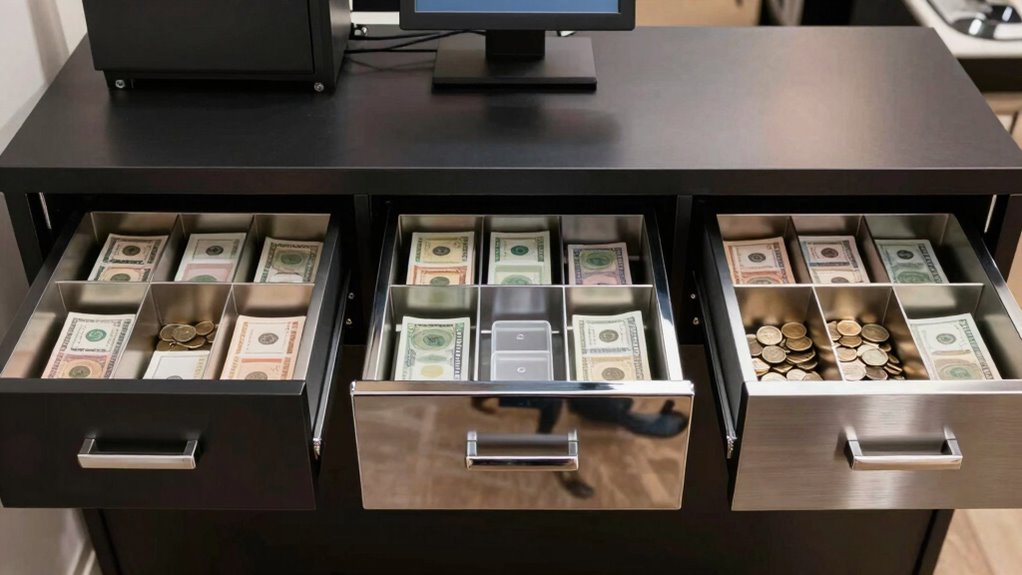
For most checkout counters, I’d start with the Volcora 16-Inch Black Drawer with Under-Counter Mounting Bracket: it pairs a full-size layout with a mounting option and media slot. The Tera 415A stands out for its eight coin compartments, while the Volcora 13-Inch Manual Push-Open is a better fit where counter space or powered connections are limited. The main tradeoffs are drawer size, connection method, cash capacity, and mounting needs—and a mismatch with your POS or receipt printer can make a drawer inconvenient or unusable. I compare all 10 options by those practical differences, so continue reading for the full breakdown and buyer guidance.

Get smart everyday buys delivered free with Prime
- Fast, free delivery on millions of items
- Prime Video, Amazon Music and more included
- Member-only deals all year
Key Takeaways
- Connection compatibility matters more than matching brand names: printer-driven drawers need a compatible receipt printer and cash-drawer port, so check the full connection path before choosing.
- The 16-inch models favor organized, busy counters: the Tera 415A and Tera three-position-lock model offer five bill and eight coin slots, while several 13-inch Volcora models trade capacity for a smaller footprint.
- Manual push-open and electronic operation solve different problems: the compact manual Volcora suits setups without a powered drawer connection, while electronic models depend on compatible POS hardware.
- Mounting is a meaningful differentiator: the Volcora black 16-inch model is the only listed option with an under-counter mounting bracket, which may matter more than extra compartments at a crowded counter.
- Features vary within similar-looking options: the Tera models share a 16-inch, eight-coin-slot layout but differ in lock design, while the Volcora options span adjustable coin slots, media slots, different sizes, and finishes.


| cash drawer for pos system | Dimensions | Material | Bill slots | Color |
|---|---|---|---|---|
| Volcora 16" Cash Register Draw | 16" x 16" x 4" | Metal | 5 | White |
| Volcora 16-Inch Black Cash Reg | 16" x 16" x 4" | Alloy steel and metal | 5 | — |
| Volcora Cash Register Drawer f | 16" x 16" x 3.5" | Heavy-duty metal | 5 | Black |
| Tera Cash Register Drawer 16 i | 16 x 16 x 4.5 inches | SPCC steel with galvanized steel base | 5 | — |
| Volcora 13" Manual Push Open C | 13" x 13.25" x 4"; 4.5" including feet | Heavy-gauge steel | — | Black |
| Volcora Cash Register Drawer f | 14 × 13.25 × 4 inches | Metal | 4 | White |
| Cash Register Money Drawer | 16.5 × 16 × 4 inches | Metal | 5 | Black |
| 16-inch Heavy Duty Cash Drawer | 16.5 × 16.1 × 3.9 inches | Metal and plastic | 5 | Black |
| Volcora 13" Electronic Cash Re | 13 × 13.25 × 4 inches | Metal | 4 | Black |
| Tera Cash Register Drawer 16 i | 16 × 16 × 4 inches | Metal | 5 | — |
More Details on Our Top Picks
Volcora 16″ Cash Register Drawer for POS System with 5 Bill and 6 Coin Slots, Removable Coin Tray, Key Lock, White
For a typical counter-based POS setup, this Volcora balances familiar cash organization with a durable metal build. Its five bill slots and six coin slots suit shops that want separate denominations without moving up to a wider drawer. The removable tray also makes cash counting and till changes more straightforward. Compared with the Volcora 16-Inch Black Drawer with Under Counter Mounting Bracket, this model has a similarly sized layout but does not list a media slot or mounting bracket, so it is the simpler choice rather than the more installation-oriented one. Its RJ11/RJ12 connection supports printer-triggered opening, but it has no direct USB connection; buyers should check printer compatibility before choosing it. The white finish may also be less forgiving of visible marks than the black alternatives.
Pros:- Metal construction suits regular counter use
- Removable tray supports easier cash counting and replenishment
- Five bill and six coin slots provide a familiar denomination layout
- Three-position lock and six included keys offer flexible access
Cons:- RJ11/RJ12 connection rather than direct USB requires a compatible printer setup
- No media slot is listed for checks or larger slips
- Six coin slots may be limiting for businesses that handle more coin denominations
Best for: Small retailers and cafés with a compatible receipt printer who want a conventional, removable-tray cash drawer in a light finish.
Not ideal for: Businesses that need direct USB connectivity, a media slot, under-counter mounting hardware, or more bill and coin compartments.
- Dimensions:16″ x 16″ x 4″
- Material:Metal
- Color:White
- Bill slots:5
- Coin slots:6
- Connectivity:RJ11/RJ12 cable
- Voltage:12–24 VDC
- Lock and keys:3-position key lock; 6 keys included
Our verdict“Choose this for a straightforward, durable drawer with a standard cash layout when your receipt printer supports its RJ11/RJ12 connection.”
Volcora 16-Inch Black Cash Register Drawer with Under Counter Mounting Bracket, 5 Bill Slots, 6 Coin Slots, Removable Coin Tray, Media Slot, Key Lock, Compatible with POS Systems
This Volcora is the strongest fit in this group for a counter where the drawer needs to sit below the work surface: it includes an under-counter mounting bracket, a feature not listed for the standard white Volcora 16-inch drawer. Its media slot gives staff a place to pass checks or other documents into the drawer without opening it, while the removable tray keeps the same familiar five-bill, six-coin arrangement. The black metal construction also suits busy retail and hospitality counters. The tradeoff is that mounting and printer compatibility need planning: automatic opening depends on an RJ11/RJ12-compatible receipt printer, and the drawer does not connect directly by USB. Its 16-inch footprint and six coin slots may also feel restrictive beside the Tera 415A, which offers eight coin compartments.
Pros:- Under-counter mounting bracket supports a less cluttered counter
- Media slot accommodates checks and other documents
- Heavy-duty metal construction with a three-position key lock
- Removable tray keeps bills and coins organized for cash changes
Cons:- Automatic opening requires a compatible receipt printer and RJ11/RJ12 connection
- Six coin slots offer less denomination separation than the Tera 415A
- The 16-inch format may not fit counters with limited under-counter clearance
Best for: Retail and food-service operators who want to mount a standard-size drawer under the counter and regularly handle checks or slips.
Not ideal for: POS setups without a compatible receipt printer, buyers who need direct USB operation, or businesses that want more than six coin compartments.
- Dimensions:16″ x 16″ x 4″
- Material:Alloy steel and metal
- Bill slots:5
- Coin slots:6
- Media slot:Yes
- Connectivity:RJ11/RJ12 cable
- Compatible printers:Star, Citizen, JAY, Bixolon
- Lock:3-position key lock
Our verdict“Pick this model when under-counter mounting and a media slot matter more than direct USB or expanded coin capacity.”
Volcora Cash Register Drawer for POS System, 16″ with Adjustable Coin Slots, Key Lock, Media Slot, Black
The defining advantage here is a removable, adjustable coin layout, which gives this Volcora more room to adapt to a store’s denomination habits than the fixed six-coin-slot Volcora drawers. It lists seven coin slots and five bill slots, plus a media slot for checks or slips. That makes it a practical choice for operators who want a standard 16-inch footprint but need some flexibility inside the tray. Compared with the Tera 415A, it has one fewer coin compartment, though the adjustable layout may matter more than raw slot count for some tills. It uses a three-position lock and RJ11/RJ12 printer connection, not direct USB. At 3.5 inches high, it is also shallower than the four-inch Volcora alternatives, but buyers should still confirm counter clearance and printer compatibility.
Pros:- Adjustable and removable coin compartments allow a more tailored till layout
- Seven coin slots provide more separation than the six-slot Volcora models
- Media slot accepts checks and other slips
- Heavy-duty metal construction and a three-position lock suit routine commercial use
Cons:- Automatic opening depends on a compatible receipt printer using RJ11/RJ12
- Seven coin compartments fall short of the Tera 415A’s eight
- No under-counter mounting bracket is listed
Best for: Independent retailers and cafés that want to rearrange coin compartments while keeping a standard 16-inch POS drawer.
Not ideal for: Businesses needing direct USB connection, eight coin compartments, or a drawer with a clearly specified mounting bracket.
- Dimensions:16″ x 16″ x 3.5″
- Material:Heavy-duty metal
- Color:Black
- Bill slots:5
- Coin slots:7, adjustable
- Media slot:Yes
- Connectivity:RJ11/RJ12
- Voltage:12–24 VDC
- Lock:3-position key lock
Our verdict“Choose this Volcora if adaptable coin storage matters more than having the largest coin-slot count or direct USB.”
Tera Cash Register Drawer 16 inch, 5 Bill 8 Coin Media Slot for POS, Model 415A
The Tera 415A stands apart for its eight coin compartments, the highest count among these five options. That extra separation can help cashiers who regularly handle several coin denominations or want to keep a dedicated space for a less common coin. It pairs that capacity with five bill slots, a removable tray, a media slot, and a steel frame with a galvanized base. Compared with the adjustable-slot Volcora 16-inch drawer, the Tera offers one more coin compartment, while the Volcora provides adjustable coin slots; the better fit depends on whether fixed extra separation or layout flexibility matters more. The 11.2-pound build and 4.5-inch height call for counter-space checks. It supports RJ12 printer-triggered opening and manual opening, but mounting brackets and screws are not included despite its under-counter mounting support.
Pros:- Eight coin compartments provide the most denomination separation in this group
- Steel construction and galvanized base suit regular commercial handling
- Supports automatic printer-triggered and manual opening
- Removable tray and media slot support organized cash and document handling
Cons:- At 4.5 inches high and 11.2 pounds, it needs more clearance and handling effort than shallower options
- Mounting brackets and screws are not included
- Automatic operation depends on compatibility with an RJ12 receipt printer
Best for: Busy cash counters that need eight separate coin compartments, a media slot, and both manual and printer-triggered opening.
Not ideal for: Businesses with shallow counters, no compatible RJ12 receipt printer, or a requirement for mounting hardware in the box.
- Dimensions:16 x 16 x 4.5 inches
- Weight:11.2 lb
- Material:SPCC steel with galvanized steel base
- Bill slots:5
- Coin compartments:8
- Interface:RJ-12
- Opening:Automatic and manual
- Lock and keys:3-position lock; 6 keys included
Our verdict“Choose the Tera 415A when eight coin compartments and manual backup matter more than a lower profile or included mounting hardware.”
Volcora 13″ Manual Push Open Cash Register Drawer for POS System, Black Heavy Duty Till with 4 Bills and 5 Coin Slots, Key Lock, Removable Coin Tray, Double Media Slots
Unlike the four 16-inch options, this Volcora is built for counters where a full-size electronic drawer would take up too much room. Its 13-inch manual push-open design does not need power for opening, which avoids dependence on a receipt-printer kick cable and makes it a simpler fit for a basic cash station. The layout has four bill compartments, five coin compartments, a removable tray, and two media slots. That is less cash capacity than the larger Volcora models or the eight-coin Tera 415A, so it suits lower-volume tills rather than busy cash lanes. The tradeoff is hands-on operation: staff must open it manually, and it has no USB or electronic opening features. Buyers should also note that the description mentions printer connection, while the listed operation is manual.
Pros:- Compact footprint fits counters where 16-inch drawers are too large
- Manual push-open operation does not require power to open
- Two media slots provide places for checks or slips
- Removable coin tray and six included keys support routine cash handling and access
Cons:- Manual opening is slower than printer-triggered operation during busy transactions
- Four bill and five coin compartments provide less capacity than the 16-inch models
- No USB or electronic opening features are listed
Best for: Small shops, pop-up counters, and service desks with limited space and modest cash volume that want a manually opened drawer.
Not ideal for: High-volume retailers needing automatic POS-triggered opening, five bill compartments, or more than five coin compartments.
- Dimensions:13″ x 13.25″ x 4″; 4.5″ including feet
- Material:Heavy-gauge steel
- Color:Black
- Bill compartments:4
- Coin compartments:5
- Media slots:2
- Operation:Manual push-open
- Lock and keys:Key lock; 6 keys included
- Removable coin tray:Yes
Our verdict“Pick this compact Volcora for a low-volume, space-limited cash station where manual opening is an acceptable tradeoff.”
Volcora Cash Register Drawer for POS Systems with Round Corners, Removable Coin Tray, 4 Bill Slots, 5 Coin Slots, 12-24V, Key Lock, White
At 14 × 13.25 inches, this Volcora is a space-saving choice for counters that cannot spare the footprint of the 16-inch Cash Register Money Drawer or the Tera 16-inch model. Its four bill slots and five coin slots suit a straightforward checkout setup, while the removable tray makes it easier to lift cash out for counting or replenishment. The white metal housing and rounded corners give it a less utilitarian look than the black steel options in this group. For POS automation, it uses an RJ11/RJ12 connection through a receipt printer, not a direct USB connection. That printer dependency is its main tradeoff: buyers without a compatible printer should look at a manual drawer instead, and busy tills may benefit from a larger compartment layout.
Pros:- Compact footprint fits tighter counters than the 16-inch models.
- Removable coin tray simplifies cash counting and restocking.
- Metal construction and a three-position key lock support routine retail use.
- White finish and rounded corners offer a distinct alternative to black drawers.
Cons:- Automatic operation depends on a compatible receipt printer and RJ11/RJ12 connection.
- Four bill slots may feel restrictive for tills that separate more denominations.
- No direct USB connection is specified.
Best for: Small shops or service counters with limited space, a compatible receipt printer, and a preference for a white finish.
Not ideal for: Businesses seeking direct USB operation, a larger till, or automatic opening without a compatible receipt printer.
- Dimensions:14 × 13.25 × 4 inches
- Color:White
- Material:Metal
- Voltage:12–24 VDC
- Bill slots:4
- Coin slots:5
- Connectivity:RJ11/RJ12
- Lock:3-position key lock
Our verdict“Choose this Volcora for a compact, white printer-driven setup; skip it if your POS needs direct USB or more cash capacity.”
Cash Register Money Drawer, Printer Driven, Compatible with Square
This drawer earns its place for buyers who want a familiar printer-driven RJ12 setup and explicitly listed compatibility with Square and QuickBooks. Its 16.5 × 16-inch footprint is larger than the compact Volcora 13-inch models, giving it a more substantial counter presence, while the five bill and five coin slots provide a practical layout for regular checkout. The removable tray supports cash handling away from the register, and the drawer can open by key or through a connected receipt printer. That printer requirement is shared with the Volcora white drawer, so neither is a fit for a printer-free workflow. This model’s listed compatibility is a helpful starting point, but buyers should still confirm their specific printer and POS connection before purchasing.
Pros:- Compatibility is listed for Square, QuickBooks, and POS systems.
- Five bill slots and five coin slots provide a balanced everyday till layout.
- Removable tray allows cash to be handled away from the drawer.
- Steel construction and key access suit a fixed checkout station.
Cons:- Automatic opening requires a connected receipt printer.
- RJ12 connectivity does not provide a direct USB option.
- Its 16.5-inch depth and 16-inch width take more counter space than the compact Volcora drawers.
Best for: Retailers using Square or QuickBooks with a compatible receipt printer who want a conventional, full-size drawer.
Not ideal for: Counter setups with limited space or businesses that need direct USB connectivity or automatic opening without a receipt printer.
- Dimensions:16.5 × 16 × 4 inches
- Weight:16.4 pounds
- Material:Metal
- Color:Black
- Bill slots:5
- Coin slots:5
- Connectivity:RJ12 cable
- Listed compatibility:Square, QuickBooks, and POS systems
Our verdict“Pick this model for a printer-based Square or QuickBooks checkout, provided its full-size footprint fits your counter.”
16-inch Heavy Duty Cash Drawer for POS System with Removable Tray, Micro Switch & Emergency Switch, Compatible with Square, Clover, Epson
The distinguishing feature here is the emergency switch, which gives staff a manual access option when normal POS-driven opening is unavailable. That makes this a more practical fit for checkout counters where a backup opening method matters than the printer-driven Cash Register Money Drawer, whose description lists key or printer opening. It also offers five bill and five coin compartments, a removable tray, and listed compatibility with Square, Clover, Epson, Star, and Bixolon equipment. Its roughly 16-inch footprint is similar to the Tera 16-inch drawer, but the Tera has eight coin slots and a media slot instead. This model’s tradeoff is that it still relies on a cable for electronic operation and has no built-in electronic security beyond its key lock.
Pros:- Emergency switch offers a manual access route if normal electronic opening is unavailable.
- Compatibility list includes Square, Clover, Epson, Star, and Bixolon.
- Removable tray supports cash sorting, cleaning, and replenishment.
- Five bill and five coin compartments suit a standard till setup.
Cons:- Electronic operation still requires a cable connection.
- The approximately 16-inch footprint may not fit compact checkout counters.
- No built-in electronic security features are specified.
Best for: Small retailers or restaurants using a listed POS or printer brand who want an emergency manual opening option at the counter.
Not ideal for: Businesses that need a compact drawer, direct USB operation, or electronic access controls beyond a key lock.
- Dimensions:16.5 × 16.1 × 3.9 inches
- Material:Metal and plastic
- Color:Black
- Bill slots:5
- Coin compartments:5
- Lock type:Key
- Listed compatibility:Square, Clover, Epson, Star, and Bixolon
- Mounting type:Tabletop
Our verdict“Choose this drawer when emergency manual access matters more than extra coin compartments or a smaller footprint.”
Volcora 13″ Electronic Cash Register Drawer for POS System with 4 Bill and 5 Coin Slots, Removable Coin Tray, Key Lock, Black
This black Volcora offers the smallest listed footprint in this batch at 13 × 13.25 inches, making it a better match for narrow counters than the larger Square-compatible drawer or the Tera 16-inch model. Its four bill slots and five coin slots keep the layout simple, and the removable tray helps staff lift out cash for counting without moving the whole drawer. Compared with the white Volcora, the main distinction is appearance rather than capacity or connection: both use an RJ11/RJ12 cable and need a compatible receipt printer for automated opening. The three-position key lock and six included keys suit shared access, but the modest slot count may constrain busier tills. It is a focused space-saving choice, not a higher-capacity alternative.
Pros:- Compact 13-inch size takes less counter space than the 16-inch options.
- Removable coin tray makes cash removal and replenishment simpler.
- Metal construction and three-position key lock suit a fixed checkout station.
- Six keys support access by multiple staff members.
Cons:- Four bill slots offer less separation than the five-bill-slot options.
- Automatic opening relies on a compatible receipt printer and RJ11/RJ12 cable.
- No direct USB connection is specified.
Best for: Small retailers, cafés, or service counters needing a compact black drawer for a compatible printer-driven POS setup.
Not ideal for: High-volume tills needing more bill separation, direct USB connectivity, or a drawer that works automatically without a receipt printer.
- Dimensions:13 × 13.25 × 4 inches
- Material:Metal
- Color:Black
- Voltage:12–24 VDC
- Bill slots:4
- Coin slots:5
- Connectivity:RJ11/RJ12 cable
- Lock type:3-position key lock
- Keys included:6
Our verdict“Choose this Volcora for a compact black counter setup; move to a larger model if your till needs more bill capacity.”
Tera Cash Register Drawer 16 inch, 5 Bill 8 Coin Slots, Media Slot, 3-Position Lock, 6 Keys
The Tera stands out for a more detailed till layout: it has eight coin slots, compared with the five on the other full-size drawers here, plus a media slot for checks or other documents. That makes it the strongest match for retailers who sort several coin denominations and want non-cash items kept close at hand. Its 16 × 16-inch body is far larger than either 13-inch Volcora, while its five bill slots and six keys support a standard shared checkout. The removable tray and three-position lock add practical cash-handling flexibility. The tradeoff is space: buyers with a tight counter may prefer the compact Volcora, and automatic opening still depends on a compatible POS system connected through RJ12.
Pros:- Eight coin slots provide more denomination separation than the other listed drawers.
- Media slot keeps checks or similar items separate from the main cash tray.
- Six keys support shared access across staff.
- Removable tray and three-position lock support routine till management.
Cons:- Its 16 × 16-inch size takes substantially more counter space than the compact Volcora drawers.
- Automatic operation requires a compatible POS system and RJ12 connection.
- At 10.6 pounds, it is less convenient to move than a lighter compact setup.
Best for: Retail, hospitality, or supermarket counters that need eight coin compartments, a media slot, and multiple staff keys.
Not ideal for: Small checkout stations or buyers who need direct USB operation or a compact drawer.
- Dimensions:16 × 16 × 4 inches
- Weight:10.6 pounds
- Material:Metal
- Bill slots:5
- Coin slots:8
- Media slot:Yes
- Lock type:3-position key lock
- Keys included:6
- Connectivity:RJ12 cable
Our verdict“Pick the Tera if coin organization and media storage matter more than saving counter space.”

How We Picked
I ranked these cash drawers for POS systems by how clearly each option fits a real checkout setup: connection type, stated POS or printer compatibility, cash capacity, footprint, mounting, and access controls. I gave extra weight to features that solve a specific workflow problem, such as a mounting bracket for counter space, adjustable coin compartments for changing cash needs, or a manual push-open mechanism for a simpler setup. Product titles do not establish compatibility with every POS terminal, printer, or software configuration, so I treat compatibility as something buyers must confirm rather than assume.
The order favors versatility and practical fit first, then specialization. The bracket-equipped 16-inch Volcora leads for its combination of full-size storage and mounting flexibility; the Tera eight-coin-slot drawers rate well for cash organization, with lock differences separating them. Compact and manual models suit narrower counters or simpler setups, while printer-driven and explicitly compatibility-focused models may be strong choices only when their connection requirements match the buyer’s existing equipment. I also account for tradeoffs: a larger drawer takes more counter space, extra compartments do not help every cashier, and a key lock or emergency switch is useful only if it fits the store’s access routine.
| cash drawer for pos system | Material | Color | Connectivity |
|---|---|---|---|
| Volcora 16" Cash Register Draw | Metal | White | RJ11/RJ12 cable |
| Volcora 16-Inch Black Cash Reg | Alloy steel and metal | — | RJ11/RJ12 cable |
| Volcora Cash Register Drawer f | Heavy-duty metal | Black | RJ11/RJ12 |
| Tera Cash Register Drawer 16 i | SPCC steel with galvanized steel base | — | — |
| Volcora 13" Manual Push Open C | Heavy-gauge steel | Black | — |
| Volcora Cash Register Drawer f | Metal | White | RJ11/RJ12 |
| Cash Register Money Drawer | Metal | Black | RJ12 cable |
| 16-inch Heavy Duty Cash Drawer | Metal and plastic | Black | — |
| Volcora 13" Electronic Cash Re | Metal | Black | RJ11/RJ12 cable |
| Tera Cash Register Drawer 16 i | Metal | — | RJ12 cable |
Factors to Consider When Choosing Cash Drawer For Pos Systems
Before choosing a drawer, I’d map the hardware and checkout routine it needs to support. A drawer that fits the counter but cannot connect to the POS printer is the wrong fit; a high-capacity model can also waste space at a low-volume stand. These checks help narrow the field beyond the differences in the individual product descriptions.
Match the Drawer to the POS Connection Path
Start by identifying how your POS opens a drawer: through a receipt printer’s cash-drawer port, a dedicated POS connection, or manual operation. A printer-driven model is not automatically compatible just because the printer or POS brand appears in a product title; connector type, voltage, and supported commands can differ. Check the exact POS terminal and printer model, then confirm that the drawer connection and required cable are supported. If your system has no compatible drawer port, a manual push-open option may avoid an equipment change, though it offers less automation. I’d also confirm whether the drawer ships with the cable you need rather than assuming it is included.
Choose Capacity for Your Actual Cash Mix
Bill and coin slots should reflect the denominations and cash volume your store handles, not simply the largest compartment count available. More coin sections can make change easier to sort during busy shifts, but they may leave less room for unusually high volumes of a particular coin. Adjustable compartments can help a drawer adapt when your cash mix changes, while fixed layouts provide a consistent arrangement for staff. Before buying, sketch the denominations you use and check whether the till layout supports them. If most transactions are electronic, paying for extra cash organization may not improve the daily workflow.
Measure the Counter and Plan the Opening Arc
Measure the available counter width and depth, then account for the space the drawer needs when fully open. A compact 13-inch drawer can be easier to place in a small kiosk or narrow service station, but its smaller bill and coin capacity can mean more frequent cash handling. A full-size model gives staff more room to organize cash, yet may crowd a printer, scanner, or customer-facing display. Under-counter mounting can clear work surface space, but only if the counter structure and mounting position support it. Check access for staff as well as the closed footprint; a drawer that opens into a walkway can interrupt service.
Decide Whether Manual or Electronic Opening Fits Service
Electronic opening links the drawer to the checkout workflow, allowing supported POS hardware to trigger it during a transaction. That convenience depends on compatible equipment and a working power or printer connection, so it adds setup checks and another point to troubleshoot. Manual push-open drawers are less dependent on POS hardware and can suit a basic or backup station, but staff must open them directly. Think about transaction speed, staff habits, and what should happen during a power or system outage. For a primary busy register, I’d prioritize the opening method that fits the existing POS routine; for a secondary station, simple manual access may be enough.
Treat Locks and Emergency Access as Workflow Features
Key locks, multiple lock positions, and emergency switches affect who can access cash and how the drawer behaves during service interruptions. A key lock can help limit casual access, but it also creates a key-management task and can slow staff if keys are not available when needed. A multi-position lock may offer more control over whether the drawer is electronically active, locked, or manually accessible, depending on the specific model. An emergency switch can provide another access route, but buyers should verify where it is located and how it works. Choose controls that match your store’s cash-handling policy rather than treating more lock features as automatically better.
Compare Durability and Maintenance Needs
A cash drawer is opened repeatedly, so look for a build and tray design suited to the expected transaction pace. A removable coin tray can make cash counting and cleaning easier, while a media slot lets staff move checks or bills without opening the drawer. Those conveniences matter most when they support an established closing or cash-handling routine. Ask how replacement keys, trays, or connection parts can be obtained if a component is lost or damaged. I’d also confirm the warranty and support terms before relying on an unfamiliar drawer for a primary register, since a low-complexity part can still disrupt checkout if it fails.
Frequently Asked Questions
How do I know whether a cash drawer will work with my POS system?
Check the exact POS terminal and receipt printer models, then confirm which device triggers the drawer and what connector and voltage it supports. Many drawers connect through a compatible printer rather than directly to POS software, so matching the POS brand alone is not enough. Ask the drawer seller or manufacturer to confirm compatibility with your precise hardware combination. Also verify whether the cable is included and whether your POS settings support opening the drawer. If you cannot confirm the connection path, choose only after getting written compatibility guidance.
Should I buy a 13-inch drawer or a 16-inch drawer?
Choose by measuring the counter and estimating how much cash staff handle between counts. A 13-inch drawer can suit a small service point or a station with limited depth, but its smaller layout may require more frequent cash management. A 16-inch model usually offers more room for bills and coins, which can help at a busier register, but it occupies more counter space and needs room to open. Measure the open position as well as the drawer’s closed dimensions. If the larger size forces staff to rearrange other checkout equipment, the extra capacity may not be worthwhile.
Is a printer-driven cash drawer a good choice for a Square or Clover setup?
It can be, but the answer depends on the specific POS hardware and receipt printer, not just the software brand. Confirm that the printer has a supported cash-drawer port and that the drawer’s connector and electrical requirements match it. Product descriptions naming Square or Clover do not necessarily cover every terminal, printer, or configuration from those brands. Check the manufacturer’s compatibility information for the exact models you own. If the setup lacks a compatible printer connection, a different connection type or manual drawer may be a better match.
When is a manual push-open drawer preferable to an electronic one?
A manual drawer makes sense when the POS lacks a supported drawer connection, when the register is a backup station, or when you want a straightforward opening method. It avoids relying on a printer signal or powered connection, but staff must open it by hand during service. That can slow a busy checkout line and may not fit a workflow that expects the drawer to open automatically after payment. Consider how often the station is used and whether it needs to integrate with transaction controls. For a primary register, verify that manual access fits your cash-control procedures.
Is an under-counter bracket worth choosing over a standard drawer?
A bracket can be useful when counter space is limited or you want the drawer fixed in a consistent position. It is not automatically the better choice: installation requires a suitable counter surface, compatible mounting points, and enough clearance for the drawer to open. Check that mounting will not interfere with cables, a seated cashier’s legroom, or access for maintenance. A standard drawer may be easier to reposition between stations or remove for servicing. Choose the bracket when its space-saving benefit outweighs the reduced flexibility of a fixed installation.
Conclusion
For the best overall fit, I’d choose the Volcora 16-inch black drawer with under-counter mounting when its connection matches the POS setup; it combines a full-size layout with a mounting option and media slot. The best value by practical utility is the Volcora 13-inch manual push-open model for a compact station that does not need electronic triggering, while beginners should favor whichever drawer has clearly confirmed compatibility with their exact printer and POS hardware rather than relying on brand names alone. For a premium-style, high-organization choice, the Tera 16-inch models offer eight coin slots, with the preferred lock design depending on the store’s access routine. For specific needs, pick the adjustable-slot Volcora if coin mixes change, the bracket-equipped option to free counter space, or the printer-driven model only when its connection is verified. My final check before ordering would be dimensions, connection requirements, included cable, and the return or support policy.